
Best custom t-shirt printing options for small business teams 2026
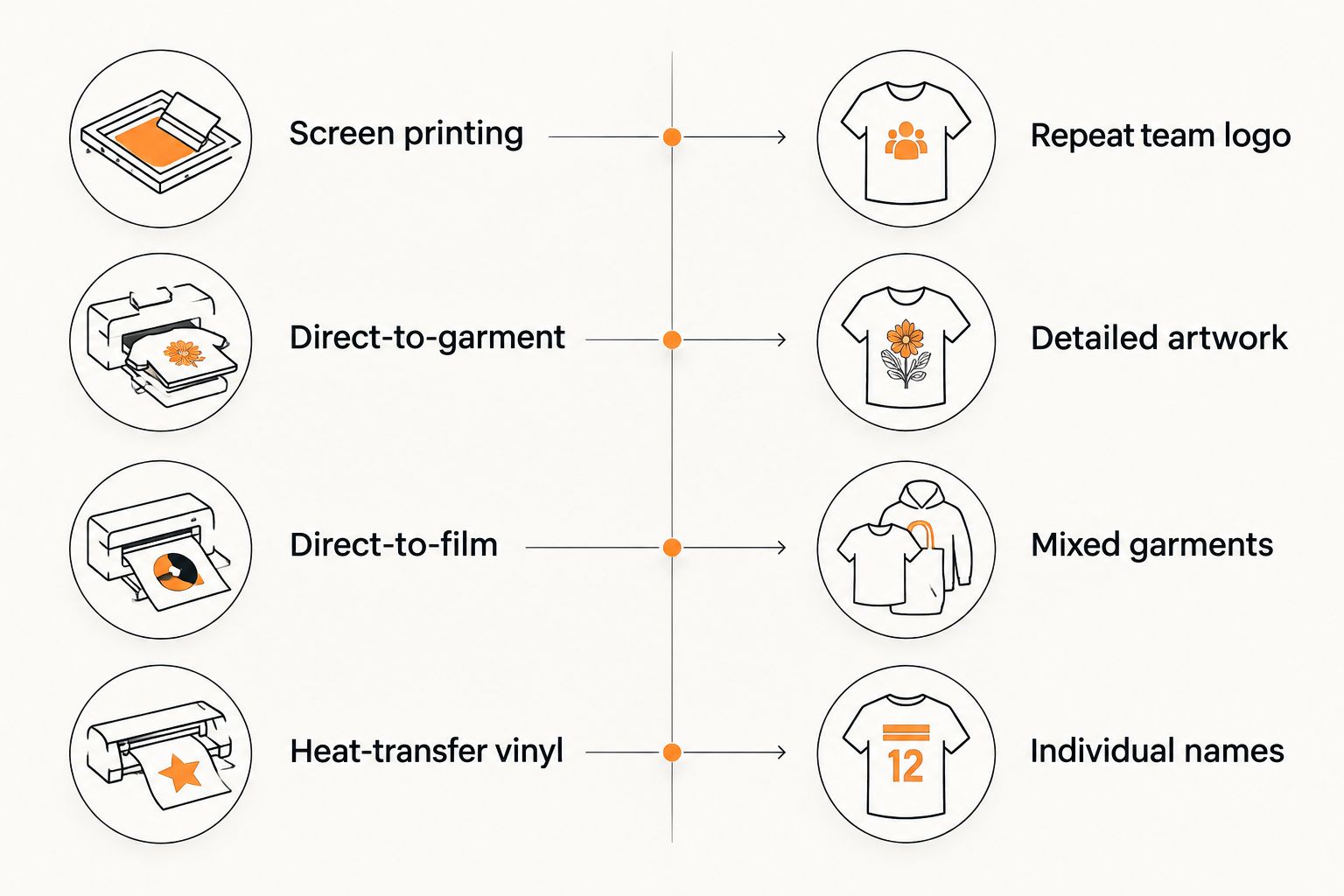
Choose screen printing for a repeat team logo, direct-to-garment for detailed cotton-shirt artwork, direct-to-film for mixed garment requirements, and heat-transfer vinyl for individual names. This 2026 guide helps small businesses ordering custom design t shirts compare printing methods, prepare artwork, and approve a useful team order rather than choosing by appearance alone.
- For custom design t shirts, choose screen printing for repeat logos and direct-to-garment for detailed cotton-shirt artwork.
- Direct-to-film suits mixed garment requirements; confirm compatibility with the exact shirt before ordering.
- Heat-transfer vinyl suits individual names and numbers, but layered designs add material to the shirt.
- Vinylstatus accepts customer artwork for custom T-shirts; confirm the printing method and garment details before ordering.
Why this matters
A staff shirt has a job: identify your team, present your logo clearly, and stay comfortable during the workday. A detailed illustration and a simple chest logo create different printing requirements. Treating them as the same order leaves important decisions to chance.
Vinylstatus offers custom T-shirts from customer artwork. For a 2026 team order, start with the garment, design, and individual size requirements—not an assumption about which printing process the shop uses.
The best method is the one that matches your actual artwork and shirt. A print process alone does not establish garment comfort, wash performance, or the accuracy of a finished order.
What makes the best custom T-shirt printing option?
Use these criteria before choosing a method:
- Artwork detail: Decide whether the design uses simple solid shapes, fine lines, gradients, or a photograph.
- Fabric match: Confirm the exact garment composition, not just a description such as soft or athletic.
- Print feel: Decide how much printed material you want across the chest or back.
- Personalization: Separate a shared company logo from employee-specific names and numbers.
- Repeat orders: Ask how the shop records garment details, placement, artwork, and color references for later orders.
For a 2026 uniform refresh, keep the approved specifications together. A saved logo file is not a complete reorder record: it does not identify the shirt, print dimensions, or placement.
Custom T-shirt printing options at a glance
The order below follows common team-buying questions, not a claim that one process outperforms every other process.
| Printing option | Best for | Standout feature | Key limitation |
|---|---|---|---|
| Screen printing | A shared, repeat team logo | Separate screens apply the design's ink colors | Separate color setup complicates changing artwork |
| Direct-to-garment | Detailed artwork on cotton shirts | Prints digital artwork directly onto fabric | Fabric and pretreatment affect the result |
| Direct-to-film | Artwork across differing garment requirements | Transfers a printed design from film onto a garment | Leaves a transferred layer on the fabric |
| Heat-transfer vinyl | Individual employee names and numbers | Cut lettering supports person-by-person changes | Intricate artwork creates cutting and weeding work |
Do not choose from the method name alone. Ask the printer to explain the proposed process for your exact garment and artwork, including any limits on small lettering or large solid areas.
1. Screen printing: best for a repeat team logo
Screen printing applies ink through a stencil held in a screen. A multicolor design generally needs separate screens for its separate ink colors, making artwork complexity an important ordering question.
This is a practical starting point when everyone receives the same company logo. A simple chest mark for a shop team presents a different setup from a full-back illustration with many colors.
Screen printing pros:
- Suits repeat placement of the same artwork.
- Supports clearly defined solid-color designs.
- Lets you discuss individual ink colors with the printer.
Screen printing cons:
- Additional colors introduce additional setup work.
- Employee-specific names require a separate personalization plan.
Best for: A stable logo shared across a team order.
Before approving screen printing, identify every printed location. A chest logo and back design are separate placements, even when both use the same artwork. Ask which color reference the printer will use and how the shirt color affects the proposed print.
Verdict: Buy screen printing when the logo repeats unchanged; skip it as the default for individually changing artwork.
2. Direct-to-garment: best for detailed cotton-shirt artwork
Direct-to-garment printing applies digital artwork directly to a garment using a garment printer. It is a relevant option for photographs, shaded illustrations, and designs that do not separate neatly into a small set of solid ink colors.
Cotton shirts are a common starting point for this process. Confirm suitability for the exact garment rather than assuming every cotton blend produces the same result.
Direct-to-garment pros:
- Accommodates gradients and photographic artwork.
- Avoids creating a separate screen for each design color.
- Keeps the original digital composition central to artwork preparation.
Direct-to-garment cons:
- Fabric composition and surface affect print results.
- Pretreatment and underbase requirements affect the finished print.
Best for: Detailed artwork on a confirmed compatible cotton shirt.
Ask how dark garments change the printing approach. An image preview on a white background does not show the same conditions as a print on a dark shirt. Keep transparent areas intentional, and supply the highest-quality original artwork you have.
Verdict: Buy direct-to-garment for detailed cotton-shirt graphics; wait if the exact garment has not been confirmed.
3. Direct-to-film: best for mixed garment requirements
Direct-to-film printing creates artwork on a film that is transferred to the garment with heat and adhesive. The design reaches the shirt as a transferred layer rather than being printed directly onto the fabric.
Consider this route when your order includes different garment materials. Compatibility still depends on the transfer system, fabric, and application conditions; mixed garments are a reason to ask specific questions, not permission to assume universal suitability.
Direct-to-film pros:
- Supports multicolor artwork in a transferred design.
- Offers a route for garment materials outside a cotton-only brief.
- Allows the printer to prepare the design separately from the shirt.
Direct-to-film cons:
- Broad solid areas leave a noticeable layer on the garment.
- Heat-sensitive fabrics and dye migration need printer assessment.
Best for: A shared design across garment types the printer has confirmed as compatible.
Discuss print coverage, especially for work performed in warm conditions. Reducing a large solid rectangle to the actual logo shapes changes how much fabric the transfer covers. Do not remove parts of a logo without checking that the revised artwork remains recognizable.
Verdict: Buy direct-to-film for a confirmed mixed-garment brief; wait when fabric compatibility is unresolved.
4. Heat-transfer vinyl: best for individual names and numbers
Heat-transfer vinyl uses material cut into shapes, weeded to remove unwanted pieces, and applied with heat. It suits straightforward lettering where the content changes from employee to employee.
Keep heat-transfer vinyl distinct from adhesive vinyl stickers. Both involve vinyl materials, but shirt decoration requires a garment-compatible product and application process.
Heat-transfer vinyl pros:
- Supports individual employee names and numbers.
- Suits simple lettering and defined shapes.
- Lets you separate a shared logo from changing personalization.
Heat-transfer vinyl cons:
- Fine details make cutting and weeding more demanding.
- Multiple layers add material and application work.
Best for: Names, initials, or numbers that differ across otherwise matching shirts.
Send a final roster rather than separate messages containing corrections. Include capitalization and spelling exactly as each employee should receive them. A printing proof cannot tell you whether an employee's name is correct unless your supplied list is correct.
Verdict: Buy heat-transfer vinyl for simple personalization; skip it for photographic artwork.
How the options are ranked
The ranking follows four ordering decisions: a repeat logo, detailed cotton-shirt artwork, mixed garment requirements, and individual personalization. Each method owns a different use case.
No supplier-specific testing or performance score underpins this comparison. For your 2026 order, the deciding evidence is the proposed garment, print specification, and approved artwork—not the position of a method in a list.
Confirm the garment before finalizing the print
A printing decision cannot fix the wrong shirt. Ask employees what they need for the actual work: freedom of movement, an appropriate neckline, and a fit they will wear throughout a shift. Then confirm the garment's fabric composition with the printer.
If your team needs a collared uniform rather than a T-shirt, comparing custom polo shirts for small businesses changes the brief: collars, button plackets, and chest placement introduce different layout considerations. Settle that garment choice before approving T-shirt-specific artwork.
For sizing, record 2 measurements: chest width and body length, using the measurement method shown in the selected garment's size chart. Do not substitute a familiar size label for a comparison with a shirt that fits the employee.
Keep the size roster tied to the chosen garment. A switch between shirt models should trigger another size check, not an automatic transfer of the old list.
Prepare artwork that survives the ordering process
Start with the original logo file, not an image copied from a social profile. Supply vector artwork when available for clean shapes and lettering; for raster images, ask the printer to confirm suitability at the intended print dimensions.
Print a paper layout at 100% scale and position it on a shirt. This checks physical size, not print color or finished texture. A design that looks balanced on a screen can occupy too much of the chest when viewed at actual size.
Use this artwork checklist:
- Print dimensions: State the intended width and height with units.
- Placement: Identify front, back, or sleeve and describe the position clearly.
- Background: Confirm whether the background should print or remain transparent.
- Small details: Ask about fine lines, small text, and gaps between shapes.
- Color reference: Agree on the reference used for color approval.
Do not use an approval image as evidence of wash performance or print feel. Those questions require a garment-specific answer or a physical sample.
Approve the order, not just the logo
A useful approval record combines artwork with order details. For a 2026 team order, check the garment model, color, sizes, quantities, print locations, dimensions, and any employee-specific text in the same review.
When fit or print feel remains uncertain, request 1 sample shirt before committing to the full run. Confirm the sample arrangements directly with the printer; do not assume they are included.
Use a single final roster with columns for employee, garment, size, and personalization. Mark shared staff shirts separately from individually assigned shirts so you can count both without mixing their purposes.
Production and shipping are separate scheduling questions. Ask when production starts, what approval is required, and how transit time affects your required arrival date. Do not apply a sticker production promise to a T-shirt order.
For Vinylstatus custom T-shirts, contact the shop with the artwork, garment requirements, quantity breakdown, and required arrival date before treating the order plan as final.
Which custom T-shirt printing option should you choose?
Choose screen printing as the starting point for a simple, unchanged team logo. Change that choice when the artwork or garment creates a different requirement: direct-to-garment for detailed cotton-shirt graphics, direct-to-film for confirmed mixed-garment needs, or heat-transfer vinyl for individual lettering.
Vinylstatus is an option for small businesses ordering custom T-shirts from their own artwork. Confirm the proposed printing method rather than assuming the shop offers every process described here.
For your 2026 order, approve the garment and artwork together. Neither decision is complete without the other.
FAQ
What’s the best printing method for small-business team T-shirts?
Screen printing is a practical starting point for a simple logo repeated across a team. Choose a different method when detailed artwork, garment composition, or individual names change the requirements.
Is direct-to-garment better than direct-to-film?
Neither method is better for every order. Direct-to-garment suits detailed artwork on compatible cotton shirts, while direct-to-film is worth discussing when garment requirements differ; confirm the exact fabric and print feel.
Can each employee have a different name on a shirt?
Yes, individual names can be produced through suitable personalization methods such as heat-transfer vinyl. Ask the printer to confirm the process and approve a final spelling and size roster.
What artwork should I send for custom design t shirts?
Send the original artwork and the intended print dimensions. Provide vector files when available for logos, and ask the printer to check raster artwork at its final physical size.
Should I order a sample before buying team shirts?
Request a sample when fit, garment feel, or print coverage remains unresolved. A digital proof checks layout but does not establish how the finished shirt feels.
Does production time include shipping?
Do not treat production time as including shipping unless the printer explicitly confirms that. Ask separately about approval, production, dispatch, and transit before setting an arrival expectation.
Does Vinylstatus offer custom T-shirts from my artwork?
Vinylstatus offers custom T-shirts from customer artwork. Confirm the garment options, proposed print method, artwork requirements, and scheduling directly before placing your team order.
One last thing
Keep personalization separate from the reusable company design. Save the approved logo, placement dimensions, garment details, and employee roster as distinct files so a staff change does not require rebuilding the entire order.
Your next order should start from an approved specification, not someone's memory of the previous shirt.