

Best truck door decal formats for trade and service fleets 2026
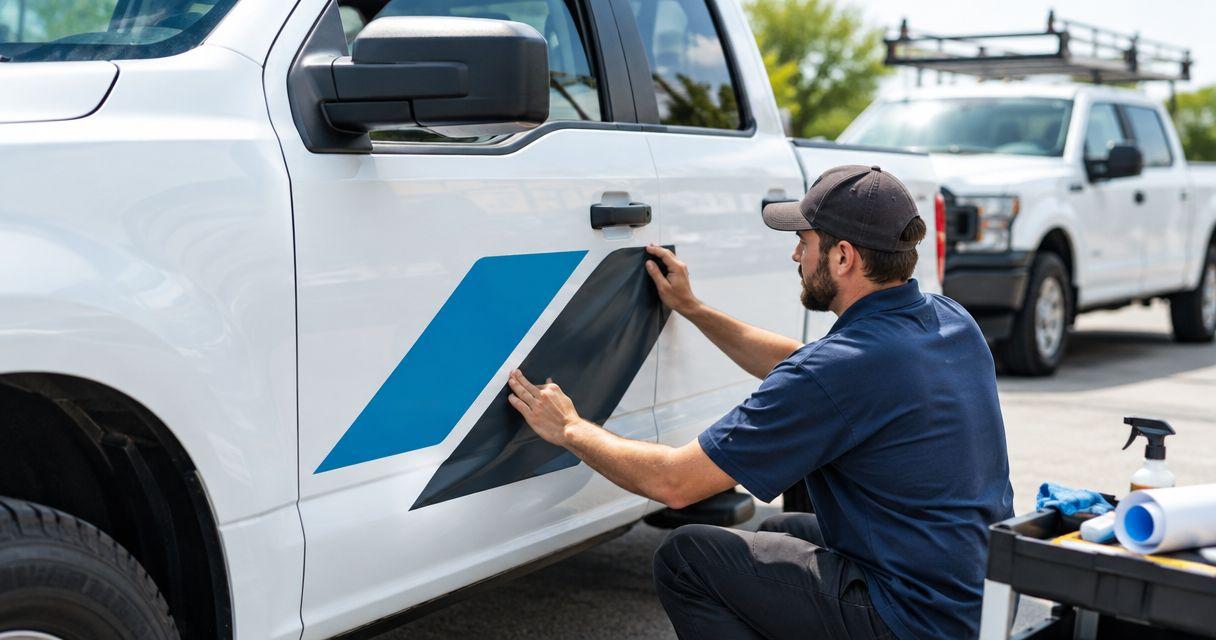
Choose printed die-cut logos for a shaped brand mark, cut-vinyl lettering for a text-led door, and rectangular panels for grouped service details. This 2026 guide compares custom truck door decals by the job they need to do, then explains what to check before ordering for a trade or service fleet.
- Choose custom truck door decals by message: shaped logo, readable lettering, grouped details, circular emblem or parked-vehicle QR code.
- Vinylstatus suits small businesses ordering custom printed stickers from their own artwork; confirm truck-door suitability before ordering.
- Approve each door layout at its intended size, including handle clearance and text readability.
- Treat QR-code decals as parked-vehicle tools, not the main message for passing traffic.
Why this matters
A truck door is not a flat business card. Handles, panel edges, curves and existing markings compete with your artwork. A format that looks tidy on a screen can put the phone number across a recess or make the service description too small to read.
For a 2026 fleet order, separate the design decision from the material decision. Vinylstatus offers custom printed stickers from your artwork, but that alone does not establish suitability for a particular vehicle surface. Confirm the intended application before approving production.
Choose the layout first, then confirm the material and installation requirements. Do not order a larger batch until both decisions are settled.
What makes the best truck door decal format
Use these criteria before comparing shapes:
- Message priority: Decide whether the door must identify your business, explain your trade or prompt a call.
- Readable artwork: Judge the logo and lettering at the intended output size, not just while zoomed in.
- Usable door area: Keep essential content clear of handles, seams, trim and pronounced curves.
- Application fit: Confirm compatibility with the actual finish, including any repainting, coating or existing wrap.
- Installation method: Ask whether the design arrives as a single printed piece or separate elements held in position by application tape.
- Repeat-order control: Keep approved artwork, dimensions and placement instructions together so replacement doors match.
A format passes only when it supports the message and fits the door. A distinctive outline does not compensate for unreadable contact information.
Truck door decal formats at a glance
These are layout recommendations, not claims that every printer supplies every construction. Ask your supplier to confirm the format, material and application method.
| Format | Best for | Standout feature | Key limitation |
|---|---|---|---|
| Printed die-cut logo | Recognizable brand marks | Outline follows the artwork | Detailed artwork needs careful sizing |
| Cut-vinyl lettering | Text-led service identification | Letters appear without a printed background panel | Separate elements require controlled placement |
| Rectangular printed panel | Grouped business details | Logo and contact information stay together | Background and panel edges remain visible |
| Circular printed emblem | Compact secondary branding | Contained badge layout | Long names and phone numbers compete for space |
| QR-code decal | Parked-vehicle follow-up | Connects a physical vehicle to a destination page | Requires a deliberate, successful scan |
1. Printed die-cut logo: for recognizable brand marks
A printed die-cut decal follows the outer contour of your artwork. Choose it when your existing logo is the main reason someone will recognize the business, rather than trying to put every service into the same shape.
Keep the logo separate from a long service list. If the mark contains a tiny tagline, inspect that tagline at the intended print size before deciding whether it belongs on the door.
Printed die-cut logo pros:
- Preserves a distinctive logo silhouette.
- Keeps the graphic visually separate from supporting text.
- Lets you position the logo independently of contact details.
Printed die-cut logo cons:
- Fine outlines and small text complicate sizing decisions.
- A logo alone does not explain an unfamiliar business.
Best for: A recognizable business logo supported by a short trade description elsewhere in the layout.
Vinylstatus lists custom die-cut stickers among its formats. Confirm the material's suitability for your truck door rather than treating the shape name as an exterior-use specification.
Verdict: Choose a printed die-cut logo when brand recognition is the door's main job.
2. Cut-vinyl lettering: for text-led service identification
Cut-vinyl lettering uses individually cut characters rather than a printed background panel. It suits a layout built around the business name, trade and contact details.
This is a construction to discuss with your supplier, not a confirmed Vinylstatus offering. Ask how the lettering is supplied and what installation instructions accompany it.
Cut-vinyl lettering pros:
- Keeps a text-led message free of a printed background rectangle.
- Lets you organize the business name and supporting details separately.
- Suits straightforward lettering without photographic artwork.
Cut-vinyl lettering cons:
- Alignment depends on the installation method and preparation.
- Detailed logos need a separate assessment rather than automatic conversion into cut shapes.
Best for: A service business whose name and trade matter more than a complex logo.
Before approving lettering, check punctuation, spacing and the exact phone number. Attractive typography cannot rescue an incorrect contact detail.
Verdict: Choose cut-vinyl lettering for a clear text-led door, subject to supplier confirmation.
3. Rectangular printed panel: for grouped business details
A rectangular printed panel puts the logo, trade description and contact information into one defined composition. Choose this format when those elements need to stay together rather than being positioned separately during installation.
The panel background becomes part of the design. Check its contrast against both the lettering and the vehicle paint; do not judge the artwork against a white screen alone.
Rectangular printed panel pros:
- Holds the message hierarchy in one composition.
- Accommodates artwork that needs a background.
- Keeps the relative position of printed elements fixed.
Rectangular printed panel cons:
- The panel edge remains part of the finished appearance.
- Extra copy quickly competes with the business name.
Best for: A business that needs its logo, service description and contact details grouped in one layout.
Remove information that does not help a viewer identify the company or take the intended next step. A door panel is not the place to reproduce an entire service brochure.
Verdict: Choose a rectangular panel when keeping the details together matters most.
4. Circular printed emblem: for compact secondary branding
A circle works as a contained badge for a short business name, symbol or established emblem. Use it as secondary branding when the main service message already appears elsewhere on the vehicle.
Do not force a wide logo into a circle just to match a preferred shape. The artwork should determine whether the format fits.
Circular printed emblem pros:
- Gives a short emblem a defined boundary.
- Keeps secondary branding separate from the main message.
- Supports a compact composition without corners.
Circular printed emblem cons:
- Long names leave less room for other content.
- Phone numbers and taglines can become cramped.
Best for: A short badge-style mark used alongside a separate service message.
Check the complete circle against the usable door area. A centered mockup can hide a nearby handle or trim line that makes the real placement awkward.
Verdict: Choose a circular emblem for compact branding; skip it for a text-heavy layout.
5. QR-code decal: for parked-vehicle follow-up
A QR-code decal gives someone standing near a parked vehicle a route to a digital destination. Use it for an action that makes sense after a scan, such as opening the business page you have selected.
Keep the code separate from the main recognition message. A person should still understand the business without scanning anything.
QR-code decal pros:
- Connects the vehicle to a specific destination.
- Supports a deliberate action while the vehicle is parked.
- Lets the printed layout carry a short instruction beside the code.
QR-code decal cons:
- Scanning depends on placement, contrast, size and surrounding clear space.
- A correct-looking code can still point to the wrong destination.
Best for: Pedestrians approaching a stationary service vehicle.
Test the final artwork at its intended size on the intended surface. Check the destination as well as whether the phone recognizes the code.
Verdict: Choose a QR-code decal as a secondary parked-vehicle tool, not the main door message.
Fit the artwork to the actual truck door
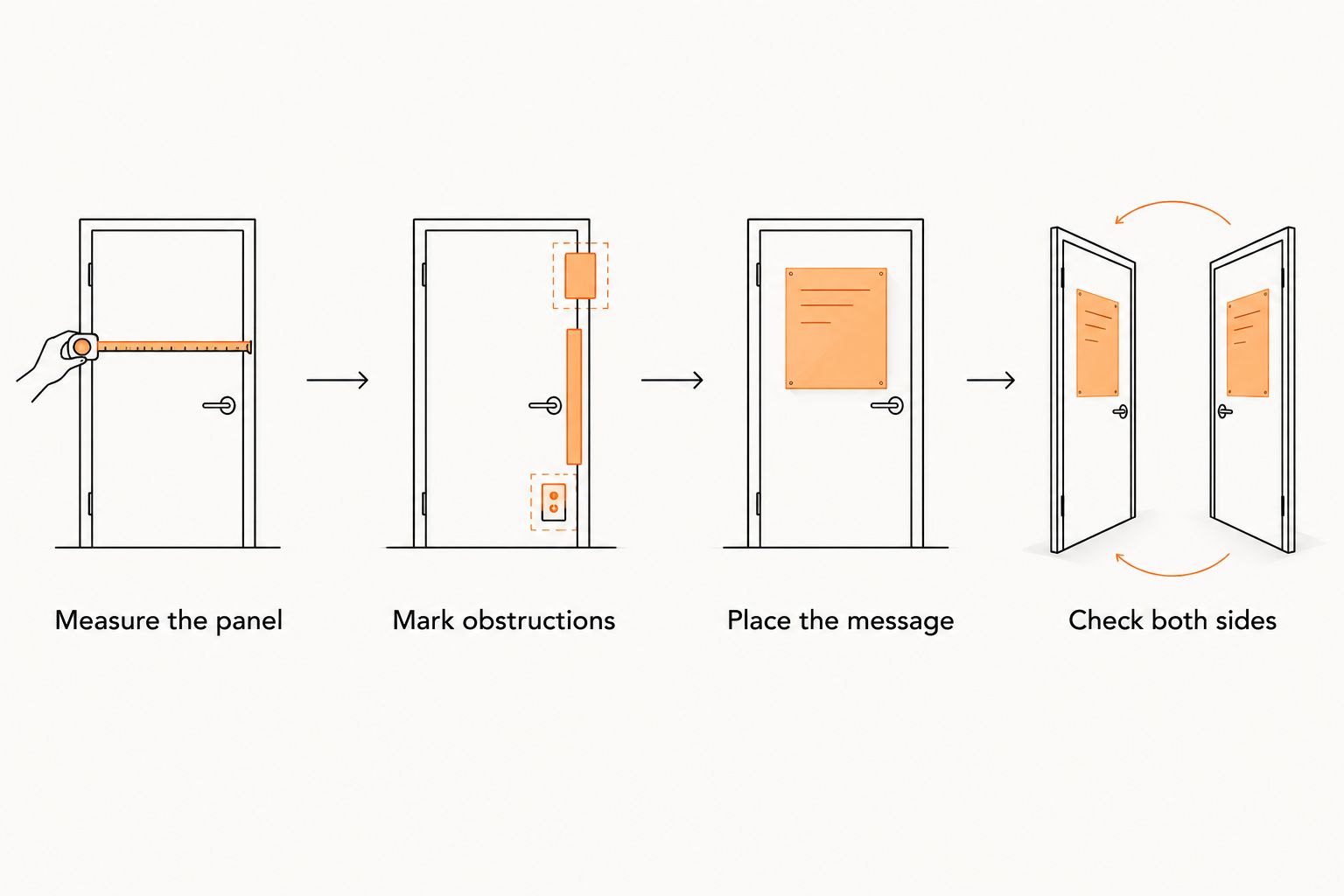
For a 2026 order, record the vehicle and door configuration before finalizing artwork. Do not assume a design approved for one truck fits another model or body style.
- Measure the panel: Record the usable area, not the overall door dimensions.
- Mark obstructions: Include handles, seams, trim and existing markings.
- Place the message: Keep essential text together on an uninterrupted area.
- Check both sides: Review each door separately rather than automatically mirroring the design.
A paper template helps reveal conflicts before adhesive touches paint. Tape the template in position, step back and check the message from the viewpoints that matter for your use.
Keep fleet branding consistent without copying every layout
Consistency means repeating the business identity, not forcing identical artwork into different spaces. Keep the business name, logo version and contact details controlled, then adapt their arrangement to each vehicle.
The same principle applies to branded workwear for trade crews: the identity stays consistent, while the layout must suit the surface carrying it. A logo arranged for a truck door does not automatically fit a garment placement, and the reverse is also true.
Give the person managing your 2026 branding a master artwork folder. Include approved door layouts and note which file belongs to which vehicle. Keep superseded files separate so an old phone number does not return with a replacement order.
Approve a proof that answers ordering questions
A useful proof does more than show that the logo uploaded successfully. It establishes what you are authorizing for print.
Check these items before approval:
- Artwork version: Confirm the current logo, spelling and contact details.
- Finished dimensions: Match the proof to the measured placement area.
- Cut boundary: Check what belongs inside the decal and what gets removed.
- Text hierarchy: Keep the business name and primary message readable.
- Background treatment: Confirm whether the design includes a printed background.
- Supply format: Clarify individual pieces, liner construction and installation requirements.
For a Vinylstatus custom sticker order, ask which proof and artwork-check options apply to the selected product. Confirm production timing after proof approval separately from shipping time; they are different parts of the schedule.
Do not treat approval as a formality. Resolve questions before authorizing the job, especially when the same artwork will be repeated across vehicles.
Set quantities from the fleet plan
Build the order from named vehicles and approved placements. Count each required position, then separate immediate installations from replacements and any planned additions.
Do not combine packaging stickers and vehicle decals into one specification merely because they share a logo. The surface, intended use and installation requirements need their own checks.
For a 2026 reorder plan, keep a record of which artwork went onto each vehicle. A spare is useful only if it matches the correct layout, dimensions and contact information.
Ask how the order is packed and identified if several designs are involved. Clear file names and placement notes help the installer distinguish left-door, right-door and secondary graphics without guessing.
How these formats were ranked
The order starts with the main buying decision: whether the door leads with a logo, text or grouped information. Compact emblems and QR codes follow because their recommended roles here are secondary.
This is a layout-based comparison, not a material durability test. No format earns an exterior-use recommendation without confirmation of the supplied material and the vehicle surface.
Which truck door decal format should you choose?
Start with a printed die-cut logo if your mark already identifies the business clearly. Choose lettering instead when the name and trade carry the message, or a rectangular panel when several details must stay together.
Vinylstatus is best suited here to small businesses ordering custom printed stickers from their own artwork, with truck-door suitability confirmed before purchase. Treat circular emblems and QR codes as deliberate supporting choices rather than automatic additions.
FAQ
What’s the best format for custom truck door decals?
Choose the format by the message: a printed die-cut shape for a recognizable logo, lettering for text-led identification, or a rectangular panel for grouped details. Confirm the supplied material is suitable for the actual vehicle surface.
Can I use ordinary custom stickers on a truck door?
Do not assume an ordinary custom sticker is suitable for a truck door. Ask the supplier to confirm the material, adhesive, surface requirements and intended exterior application.
Should my truck door decal include every service I offer?
Keep the door focused on business identification and the main service message. A long service list competes with the business name and contact details.
Are die-cut logos better than rectangular decals?
Die-cut logos suit shaped brand marks, while rectangular decals keep several printed details together. Choose based on the artwork and available door area, not shape alone.
Do QR codes work on truck door decals?
Use a QR code for someone approaching a parked vehicle, and test the final artwork at its intended size. Check contrast, surrounding clear space, placement and the destination page before ordering.
What should I check before approving a decal proof?
Check the artwork version, finished dimensions, cut boundary, background and every contact detail. Compare the layout with the measured door and confirm the installation method.
How many fleet decals should I order?
Count the approved placements on named vehicles, then identify replacements and planned additions separately. Keep different vehicle layouts distinct so spare decals match their intended positions.
One last thing
Test the message without explaining it. Show someone the door mockup at its intended size and ask what business it represents and what action to take. If you need to explain the layout, simplify it before printing.
Related guides