

Bulk custom stickers for small businesses: a 2026 ordering guide

Small-business bulk custom stickers are printed labels ordered in quantity to put your artwork on packaging, products, or giveaways, with the aim of supporting repeatable business use. This 2026 guide explains how to choose a format, size, finish, and quantity without tying up money in stickers you cannot use.
- Vinylstatus suits small businesses ordering bulk custom stickers from their own artwork for packaging, logos, and giveaways.
- Choose sticker size from the actual placement area, not the dimensions of your artwork file.
- Calculate quantities from planned uses; separate packaging needs from optional giveaways.
- Check the online proof before approval, and keep production time separate from shipping time.
Why bulk custom stickers matter for small businesses
A packaging sticker has a defined job: identify your business, carry useful information, or finish a package. A giveaway sticker has a different job: make someone want to keep and display your design. Ordering both as the same size and artwork creates a compromise before printing begins.
Vinylstatus offers custom printed stickers from your artwork, with free online proofs and human artwork checks. Vinylstatus suits small businesses that want bulk custom stickers made from their own artwork for packaging and giveaways. Proof review helps you check the order, but you still need to confirm the spelling, dimensions, destination links, and intended use.
The useful starting point for a 2026 order is your packaging workflow, not a quantity selector. Decide where each sticker goes, who applies it, and how quickly the design will become outdated. Those answers determine the order more directly than a preference for a particular shape.
How to plan your bulk sticker order
1. Define the job before choosing the sticker
Start with the package, product, or handout you already use. Place a paper mockup where the sticker will go and check whether it serves a clear purpose. A logo on a plain mailer needs different treatment from a QR code on an instruction card.
Give each design one main job. If a small label must carry a logo, promotion, instructions, social handle, and QR code, the problem is the brief—not just the artwork size. Move supporting information to an insert or destination page instead of shrinking everything.
Separate everyday branding from campaign-specific messages. A general logo can remain useful after a promotion ends; a dated offer cannot. For your 2026 purchasing plan, record which designs support routine packing and which belong to a particular event.
Write a short order brief that another employee can understand without asking you to explain it. Include the surface, placement, artwork version, and intended use. This brief becomes the reference when you review the proof and reorder later.
- Packaging: identify the business on boxes, bags, or mailers.
- Product labeling: carry the information appropriate to that item.
- Giveaways: prioritize artwork people would choose to display.
- QR codes: connect a physical item to a specific online destination.
2. Measure the placement and test the size
Use a ruler and a paper cutout before opening a design file. Measure the usable flat area, not the entire package. Folds, seams, handles, and curved edges reduce the space where a sticker can sit cleanly.
As a planning exercise, compare a 2-inch paper circle with a 3-inch paper circle on your actual packaging. These are mockup sizes, not product specifications or a recommendation for every order. Inspect each from the distance at which someone will normally see the package.
Check more than appearance. A sticker that looks balanced on a closed box can cross a fold when the box opens. A label that fits a container on paper can wrap far enough around it to hide part of the design.
For packaging staff, placement also needs to be repeatable. Choose an obvious reference point, such as the center of a flat panel, rather than a position that requires careful judgment on every package. Save a photo of the approved mockup for your packing instructions.
- Measure the clear placement area in inches.
- Cut paper mockups at the proposed finished dimensions.
- Keep important information away from seams and folds.
- Check the smallest text at actual printed size.
- Photograph the chosen placement on the real package.

3. Match the shape and finish to the artwork
Choose the shape because it helps the design or application—not because every order needs a distinctive outline. Circles and squares suit artwork arranged within a regular boundary. Die-cut stickers follow a custom outline, so the silhouette becomes part of the design.
Holographic stickers introduce a reflective effect. Decide which parts of the artwork should remain visually dominant and check the proof against that intention. Do not treat a reflective effect as a substitute for readable lettering or a clear logo.
When comparing matte and glossy finishes, assess the same artwork under the lighting where people will see it. Glossy surfaces show reflections; matte surfaces reduce that reflective appearance. Confirm which finishes apply to your selected format rather than assuming every combination is offered.
Vinylstatus offers die-cut, holographic, circle, square, and QR-code stickers. That range gives you different ways to answer the buying question, but the format alone does not establish suitability for every surface or exposure. Confirm the selected product's material and application guidance before committing the order.
- Circle: use a contained layout that works inside a round boundary.
- Square: arrange the design within a regular frame.
- Die-cut: use the artwork's outline as part of the presentation.
- Holographic: make the reflective effect an intentional design choice.
- QR code: prioritize contrast, clear space, and scan testing.
4. Prepare artwork that works at printed size
Inspect the artwork at its intended physical dimensions. Enlarging the file on a monitor makes small lettering look more comfortable than it will on a package. Print a paper version at actual size and check it without zooming in.
Keep the main logo distinct from background decoration. Remove details that do not survive the size test, and leave enough room around important elements for the proposed cut. Follow the selected product's artwork instructions for file format, resolution, bleed, and color preparation rather than applying a guessed specification.
For QR-code artwork, preserve the quiet zone: the clear area surrounding the code. Keep decorative graphics outside that area. Scan the actual-size test with more than one phone and confirm that the destination is the page you intend customers to visit.
Human artwork checks help catch production issues, but your business owns the content decision. A correctly printed outdated phone number is still an ordering mistake. Keep a single approved artwork file so an employee does not upload an older version during a reorder.
- Inspect text and thin details at actual size.
- Use the printer's stated file and preparation requirements.
- Keep essential content clear of the proposed cut edge.
- Test QR codes from the physical-size mockup.
- Check spelling, contact details, and destination links.
5. Calculate quantity from a defined period of use
Count what you expect to use before choosing the order quantity. Separate required applications from optional extras. Packaging demand comes from the number of packages you plan to send; giveaway demand comes from a separate distribution plan.
Here is a planning example, not a sales forecast: if you expect 200 packages and apply 1 sticker per package, the packaging requirement is 200 stickers. If you also plan 50 handouts, the combined planned use is 250 stickers before any deliberate allowance for application errors or internal samples.
Do not add a vague cushion automatically. Name its purpose. Keep the allowance separate so you can compare planned use with actual use after the order arrives. This makes the next quantity decision less dependent on memory.
For a 2026 event, consider whether the artwork remains useful afterward. A general logo sticker and an event-specific design should not inherit the same quantity just because they share dimensions. Your storage space, artwork stability, and distribution plan all belong in the decision.
- Count packages, products, or handouts within a defined period.
- Multiply by the stickers used per item.
- Separate routine demand from event demand.
- Add only an allowance with a stated purpose.
- Record leftover quantities before placing the next order.
6. Approve the proof and plan the packing workflow
Review the proof against your order brief, not just your memory of the design. Check the finished dimensions, artwork version, orientation, cut shape, and every piece of text. Compare the proof with the actual-size mockup you already tested.
Vinylstatus provides free online proofs and human artwork checks. Its stated two-business-day production period starts after proof approval; shipping time is additional. Do not treat production time as a delivery promise. Allow time for your own review and any corrections before production begins.
Printed stickers use split-back liners for easier peeling. That feature helps with handling, but it does not decide where the sticker belongs or whether the surface is suitable. Write down the placement and application instructions that your packing team should follow.
For your 2026 schedule, record the proof-approval date separately from the required arrival date. After delivery, compare the finished stickers with the approved proof and check the first application on the intended surface before putting the full quantity into the packing workflow.
- Proof review: verify dimensions, content, orientation, and cut shape.
- Proof approval: approve only the version you intend to print.
- Production: count the stated period from approval.
- Shipping: allow transit time in addition to production.
- Application check: inspect the first sticker on the intended surface.
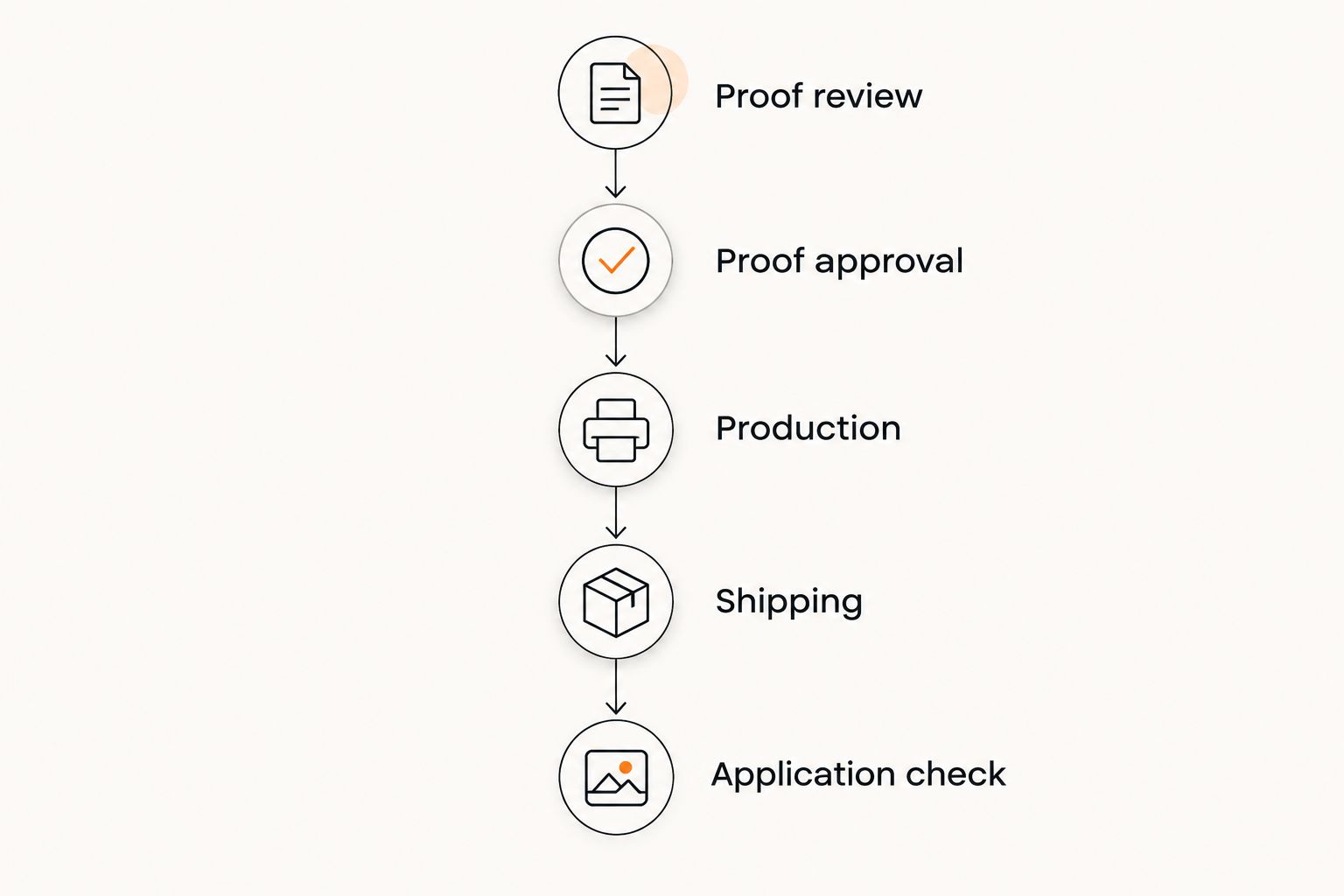
Compare sticker formats by the job they need to do
The format decision comes after the brief and size test. Choose the simplest format that supports the artwork and intended use. A custom outline adds little if the design is already a plain circle; a reflective finish needs a reason beyond looking different on screen.
| Option | Best for | Main advantage | Key limitation |
|---|---|---|---|
| Circle stickers | Round logos and compact packaging marks | A consistent boundary for a centered layout | Long horizontal artwork needs rearranging or reducing |
| Square stickers | Artwork built within a square frame | A regular shape for repeatable placement | A square layout does not naturally suit every logo |
| Die-cut stickers | Logos or illustrations with a distinct silhouette | The cut follows a custom outline | Complex outlines need careful proof review |
| Holographic stickers | Giveaways designed around a reflective effect | The surface effect becomes part of the artwork | Reflections compete with details unless planned |
| QR-code stickers | Linking packaging to an online destination | Connects a physical touchpoint with a specific page | Requires quiet-zone, contrast, size, and scan checks |
These options are not substitutes for checking product instructions. A format name does not confirm adhesion to your particular packaging, suitability for a curved container, or performance in a demanding environment. Ask the application question before ordering rather than inferring the answer from the shape.
Common mistakes small businesses make
Ordering giveaways as if they were packaging labels
Packaging labels serve a controlled placement. Giveaways depend on someone choosing to use them. Keep essential packaging information on the packaging design and give the handout a separate brief when its purpose is different.
Choosing quantity before confirming the artwork's useful life
A larger order creates a storage problem when the design includes an expiring campaign or changing contact detail. Finalize stable content first, then calculate the quantity that serves your planned period of use.
Approving the proof only on a large screen
A full-screen preview hides the practical problem of tiny text. Compare the proof with an actual-size printout, and check the selected dimensions independently. Screen appearance does not replace a physical placement test.
Treating a sticker as a tested packaging seal
Placing a sticker across a box opening does not establish tamper evidence, structural strength, or compliance with a packaging requirement. If the application depends on one of those properties, confirm it explicitly instead of relying on the sticker's appearance.
FAQ
What’s the best way to order bulk custom stickers for a small business?
Start with the intended use, physical placement, and expected quantity, then prepare the artwork and review the proof. Choose the format after testing the design at actual size on the package or item.
Is a die-cut sticker better than a circle sticker for my logo?
A die-cut sticker suits a logo whose outline is part of the design; a circle suits artwork arranged inside a round boundary. Neither format is automatically better, so compare paper mockups on the intended surface.
How many bulk custom stickers should I order?
Order against a defined period of planned use, with separate quantities for packaging and giveaways. Calculate stickers per item and add only an allowance with a clear purpose.
Can I put a QR code on a custom sticker?
Yes, Vinylstatus offers QR-code stickers. Preserve the quiet zone, use clear contrast, and scan an actual-size test that leads to the intended destination before approving the artwork.
Does two-business-day production include shipping?
No, Vinylstatus’s stated two-business-day production period begins after proof approval, and shipping time is additional. Plan your review time and transit time separately from production.
What should I check before approving a sticker proof?
Check finished dimensions, artwork version, cut shape, orientation, spelling, and destination links. Compare the proof with an actual-size mockup rather than judging only from a magnified preview.
Should I use the same sticker for packaging and giveaways?
Use the same sticker only when the artwork and dimensions serve both purposes. Separate the designs when packaging needs practical information that would make the giveaway less useful or appealing.
One last thing
Keep a finished sticker with the approved artwork file, dimensions, and a photo of its placement. A saved proof shows what you approved; a physical sample shows what your team actually used. For the next 2026 reorder, check that reference against the current packaging before repeating the quantity. Reordering should repeat a working application, not an unchecked old decision.