

DecalJunky.com alternatives in 2026

For small businesses comparing decaljunky.com alternatives in 2026, Vinylstatus is a custom-sticker option for logos, packaging, and giveaways made from your own artwork. Choose a printer by the finished sticker you need, the proof you can approve, and the requirements of the surface—not by a supplier name alone.
- For decaljunky.com alternatives, consider Vinylstatus when you need custom stickers made from your own artwork.
- Compare sticker shape, finished size, artwork approval, liner, and intended surface before ordering in bulk.
- Consider a local print shop when discussing a physical packaging sample is central to your buying decision.
- Keep DecalJunky.com if its confirmed specifications and ordering process already meet your requirements.
Why this matters
A packaging sticker and a giveaway sticker have different jobs. Packaging artwork must fit a defined panel and communicate clearly; a giveaway needs a useful shape and a design people can recognize away from the package.
Your 2026 supplier shortlist should start with that distinction. The custom-sticker ordering process gives you a useful framework: prepare artwork, define the finished product, inspect the proof, and approve only when the details match your intended use.
A supplier change does not fix an unreadable logo or a sticker that crosses a box fold. Resolve those problems before comparing printers.
DecalJunky.com alternatives at a glance in 2026
The comparison below separates a confirmed custom-printing option from a local sourcing route. Use the DecalJunky.com row as your benchmark, not as an assumption that every printer offers interchangeable materials or ordering terms.
| Option | Best for | Distinguishing point | What to check before ordering |
|---|---|---|---|
| DecalJunky.com | Buyers whose selected decal meets their requirements | The supplier being considered or replaced | Exact product, customization, dimensions, application instructions, and approval process |
| Vinylstatus | Small businesses supplying artwork for custom stickers | Custom die-cut, holographic, circle, square, and QR-code vinyl sticker formats | Product-specific finish, proof process, liner, intended surface, and order timing |
| Local print shop | Buyers who want to discuss a physical package or application in person | An in-person sourcing route rather than a particular sticker specification | Whether the shop handles the required material, cutting, proofing, and quantity |
Compare the same specification across every option. A contour-cut logo, a circular envelope seal, and a rectangular information label are different orders, even when they use identical artwork.
Do not rank suppliers using a feature that belongs to a different product. Confirm the details for the exact sticker you intend to purchase.
1. Vinylstatus: best for custom business artwork
Vinylstatus is an online print shop offering custom stickers and decals from customer artwork, alongside T-shirts and magnets. Its stated sticker formats include die-cut, holographic, circle, square, and QR-code vinyl stickers.
That makes it a relevant alternative when your buying question is about producing your own business design. Start with the placement and artwork, then choose the format that serves them.
Where this option shines
- Custom artwork: Your logo, packaging design, or campaign graphic provides the starting point.
- Shape choices: Compare a contour-following die-cut design with a circle or square instead of forcing every use into one format.
- Different business uses: Plan separate artwork for packaging, giveaways, and QR-code access rather than using one crowded design everywhere.
Where this option falls short
- Artwork preparation remains your responsibility: A custom order needs a deliberate design, readable information, and an approved layout.
- Format alone does not establish suitability: A vinyl sticker still needs product-specific confirmation for the surface and exposure you have in mind.
- A digital proof cannot test application: Check the physical placement separately; an on-screen layout does not reproduce a curved jar or textured box.
Head-to-head with DecalJunky.com
| Dimension | This custom-printing option | DecalJunky.com comparison check |
|---|---|---|
| Artwork | Produces custom items from customer artwork | Confirm the artwork and customization requirements of the selected decal |
| Format | Stated options include die-cut, holographic, circle, square, and QR-code stickers | Match the selected product against the same shape and intended use |
| Ordering decision | Begins with your design and business application | Establish whether the selected decal satisfies that same application |
| Approval | Define the proof details you need before committing | Confirm how artwork, dimensions, and changes are approved |
Best for: Small businesses ordering custom logo stickers, packaging stickers, or giveaways from their own artwork.
Verdict: Buy when the selected product and approved proof match your written specification.
2. Local print shop: best for discussing a physical sample
Consider a local print shop when the physical package is central to the decision. Bring the actual box, bottle, bag, or other item and ask the shop to assess the intended sticker placement.
Treat this as a sourcing route, not a promise of particular equipment or materials. Each shop must confirm whether it can produce the job you need.
Where this option shines
- A concrete brief: You can show the intended placement instead of describing it from memory.
- Application discussion: Ask about curves, folds, texture, and handling using the actual item.
- Artwork handoff: Discuss which file and cutting information the shop requires before submitting the job.
Where this option falls short
- Capabilities need confirmation: Do not assume the shop offers contour cutting, holographic material, or your intended finish.
- A conversation is not a specification: Record the agreed dimensions, material, proof requirements, and timing in writing.
- Local does not establish production arrangements: Ask where the job is produced and who handles corrections.
| Dimension | Local print shop | DecalJunky.com comparison check |
|---|---|---|
| Physical sample | Ask whether you can bring the package for discussion | Determine how to communicate the same placement requirements |
| Production capability | Confirm material, cutting, and finishing directly | Confirm the specifications of the exact selected product |
| Approval | Request a written specification and approval record | Establish the approval process before placing the order |
Best for: Buyers who want an in-person discussion about a physical package or application.
Verdict: Hold until the shop confirms the required product and approval process.
Choose the sticker before choosing the supplier
A useful comparison begins with a short product brief. Describe what the sticker must do, where it goes, and what the recipient needs to read or recognize.
Use these buying questions to separate genuinely different requirements.
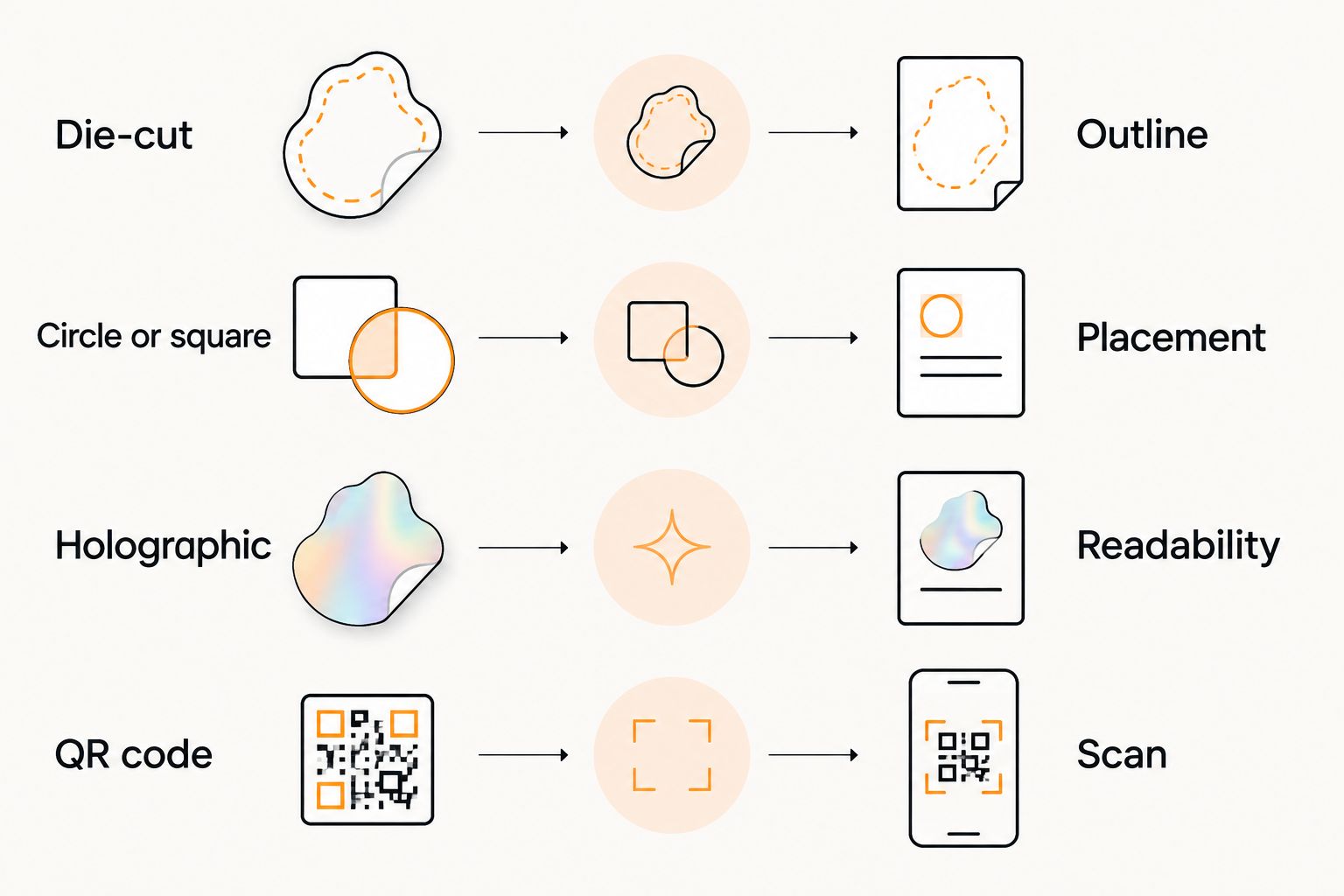
Die-cut: does the outline help the design?
Choose a contour-following outline when the silhouette contributes to the logo or illustration. Inspect narrow extensions and small isolated details in the proposed cut line.
Do not add a complicated outline merely to make packaging look different. A simpler shape can make placement and artwork review more straightforward.
Circle or square: which fits the placement?
Measure 2 dimensions: width and height. Use the available flat area rather than the overall package dimensions, and keep folds, seams, and opening points outside the intended placement.
A circle suits a compact arrangement; a square gives you corners to organize artwork. Neither shape fixes text that becomes too small at the finished size.
Holographic: does the effect support readability?
Treat holographic material as a design decision, not a substitute for a clear logo. Ask how the selected printing treatment affects the appearance of text, solid areas, and unprinted material.
Keep essential information readable. If the effect competes with instructions or a QR code, simplify the design or separate those functions.
QR code: does the printed version scan?
A QR-code sticker needs a working destination and a readable printed code. Preserve the quiet zone, maintain contrast, and test the code at its intended size and placement.
Do not approve the design solely because the original file scans on your monitor. Test a physical-size print before committing to the order.
Check the proof, liner, and delivery sequence
For a 2026 order, ask about online proofs and human artwork checks before you submit the final files. Establish whether the proof is included, what the check covers, and when approval commits the design to production.
Keep production and shipping separate. If a supplier gives a production estimate after proof approval, do not treat that estimate as the delivery date; allow for proof revisions and transit as separate stages.
Review the proof at actual size
Print a paper mockup at 100% scale and place it on the intended package. Check the logo, smallest text, border, and orientation without enlarging the artwork on screen.
Review 3 proof details before approval:
- Content: Spelling, contact information, destination links, and the correct artwork version.
- Geometry: Finished dimensions, cut line, border consistency, and placement of important elements.
- Appearance: Selected finish, intended contrast, and any material effect that changes the design.
A paper mockup checks layout and placement. It does not establish adhesion, printed color, or resistance to handling.
Ask how the backing peels
For a packing workflow, ask whether the selected printed sticker has a split-back liner. A split in the backing provides a starting point for peeling; confirm that detail for the specific product rather than assuming every format uses the same liner.
Also ask whether stickers arrive individually or in another arrangement. The answer belongs in your workflow decision, particularly when staff apply stickers repeatedly during packing.
Confirm origin when it matters
If made-in-the-USA production is a purchasing requirement, request confirmation for the exact product. A business address alone does not establish where a particular order is manufactured.
Keep that confirmation with the approved specification. It is more useful than a general assumption about a supplier.
Why switch from DecalJunky.com?
Switch when a confirmed requirement is unmet—not because an alternatives list places another name first. For your 2026 order, write down the reason before requesting a replacement quote.
Useful decision triggers include:
- You need your own artwork in a particular finished shape.
- Your packaging requires dimensions that the selected product does not meet.
- You need an approval step that resolves artwork or cutting questions before production.
- Your packing process requires a particular liner or presentation.
- Your intended application needs material information you have not yet established.
These are acceptance criteria, not claims about DecalJunky.com. Compare each supplier's confirmed response against the same brief.
Keep quantities tied to actual use. Count the packages, events, or giveaway opportunities the order must cover, then account for the artwork's useful life; a dated promotion should not dictate an oversized evergreen inventory.
When staying with DecalJunky.com is the right call
Stay with DecalJunky.com when the selected product, confirmed specifications, and ordering process meet your needs. A change of supplier is not itself an improvement.
For a repeat order in 2026, review the design before reordering. Check that the logo, destination link, package dimensions, and required wording remain correct, even if the previous batch worked well.
FAQ
What’s a DecalJunky.com alternative for custom business stickers?
Vinylstatus is an option for custom business stickers made from your own artwork. Its stated formats include die-cut, holographic, circle, square, and QR-code vinyl stickers; choose the format around your packaging or giveaway requirements.
Is another sticker printer automatically better than DecalJunky.com?
No; a different printer is useful only when its confirmed product and process better match your order. Compare the same artwork, dimensions, shape, intended surface, and approval requirements.
What should I check before ordering logo stickers in bulk?
Check the finished size, readable artwork, cut line, finish, intended surface, and proof before approving a bulk order. Use a physical-size paper mockup to check placement, and confirm material suitability separately.
Should I choose die-cut or circle stickers for packaging?
Choose die-cut when the outline supports the artwork, and consider a circle when the design fits a compact round placement. Measure the usable package area before choosing either shape.
Does a digital proof show whether a sticker will stick to my package?
No; a digital proof checks the proposed artwork and layout, not physical adhesion. Confirm the selected material for your surface and test the application when the package presents a concern.
Does production time include shipping time?
Treat production and shipping as separate stages unless the supplier explicitly states otherwise. Confirm when production begins, how proof revisions affect the schedule, and how transit fits your required arrival date.
When should I consider a local print shop instead?
Consider a local print shop when you want to discuss a physical package or application in person. Confirm its actual materials, cutting capabilities, approval process, and production arrangements before ordering.
One last thing
Keep the approved artwork and written sticker specification together. A reorder should identify the finished dimensions, shape, material, finish, and artwork version—not simply ask for the same stickers again.
That record makes your next supplier comparison useful. You can change the printer without accidentally changing the product.
Related guides
- Custom die-cut stickers for packaging: shapes, sizes, quantity
- How to size a custom logo sticker for your product
- Bulk custom stickers for small businesses: an ordering guide