

How to use stickers to market your small business

Use business stickers for marketing by assigning each design a specific job: identify your packaging, give customers something worth keeping, or send them to a useful page. Choose the placement before the size, keep the artwork readable, and approve the proof only after checking the design at its intended dimensions.
- Business stickers for marketing need a defined placement and purpose before you choose a shape or quantity.
- Vinylstatus offers custom stickers from your artwork; choose the format around packaging, logos, or giveaways.
- Check logo readability, cut lines, finish, and QR-code scanning before approving artwork.
- Base bulk quantities on planned distribution, not an assumed increase in sales.
Why this matters
A sticker can identify the business behind an order without requiring the customer to open another marketing message. But a logo placed somewhere nobody notices is still a missed opportunity. Your distribution plan matters as much as your artwork.
Vinylstatus custom stickers fit small businesses that want to print their own artwork for packaging and giveaways. Start with a defined use, then choose a format from Vinylstatus. The trade-off is straightforward: a custom shape can suit your artwork, but it cannot fix an unreadable logo or an unclear purpose.
For your 2026 campaign, write down where the sticker will go and what you want the recipient to do. Keep that brief beside the artwork throughout ordering.
How do you use stickers to market your small business?
Use stickers at a point where customers already interact with your business. Packaging creates a planned placement; a giveaway gives the customer control over whether to display it. A QR-code sticker adds a destination, but it also adds a scan requirement.
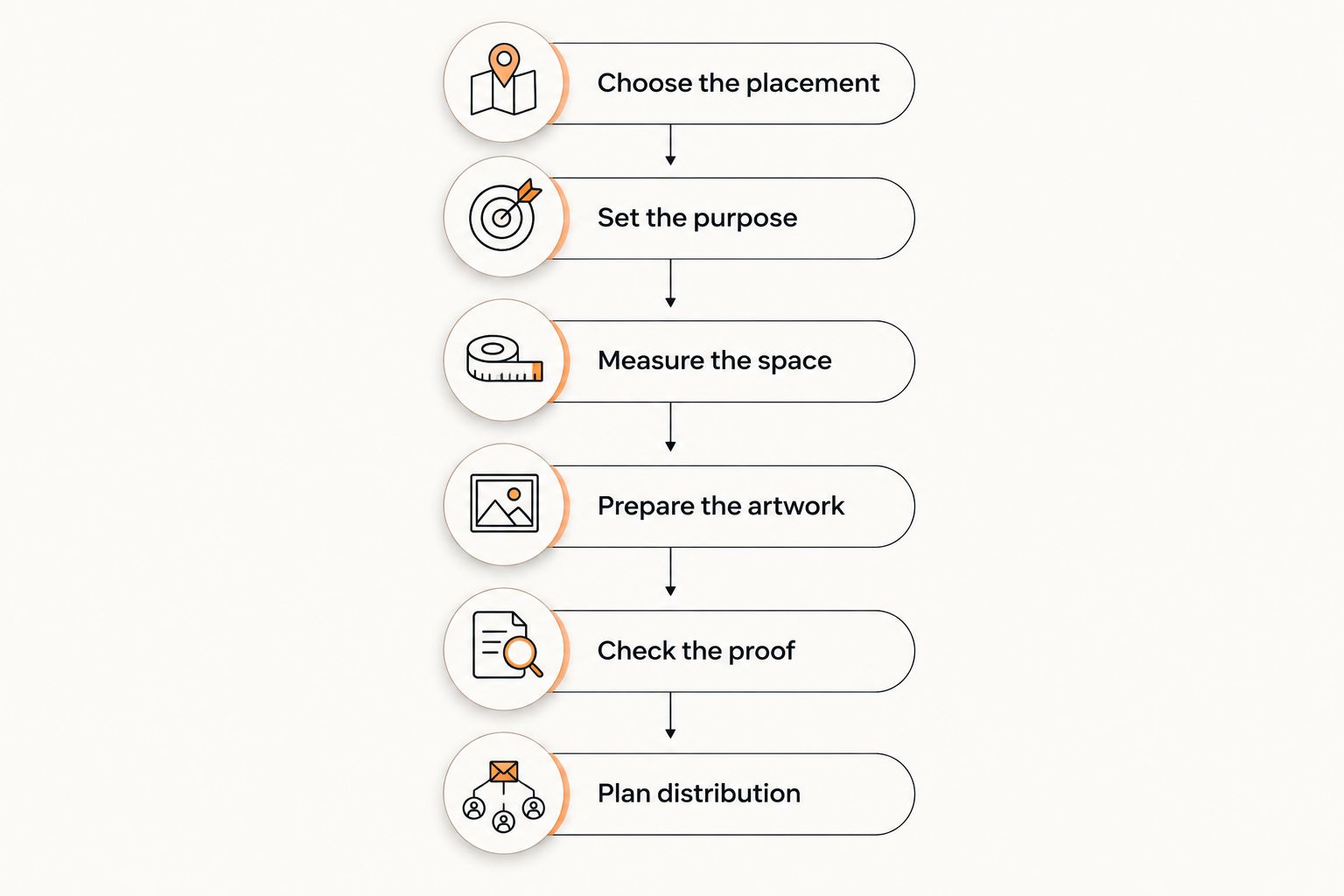
Follow this sequence before placing a bulk order:
- Choose the placement. Identify the actual box, bag, insert, counter display, or handout situation.
- Set the purpose. Decide whether the sticker should identify, decorate, explain, or prompt an action.
- Measure the space. Check the available flat area and nearby seams, folds, labels, or openings.
- Prepare the artwork. Make the logo and any supporting text readable at the chosen dimensions.
- Check the proof. Review the crop, cut line, spelling, orientation, and any destination encoded in a QR code.
- Plan distribution. Connect the order quantity to actual packages, events, or customer requests.
The sequence prevents a common ordering mistake: choosing a sticker you like before deciding where it belongs. It also gives everyone approving the artwork the same standard for judging it.
Which sticker format fits the marketing job?
Choose the format around the job, not around novelty. A straightforward logo and a detailed illustration need different layout decisions. Use this comparison to narrow the artwork before requesting a proof.
| Format | Best for | Practical advantage | Limitation to check |
|---|---|---|---|
| Circle sticker | Compact logos and packaging identification | Gives a centered design a clear boundary | Wide wordmarks leave less usable space |
| Square sticker | Logos with supporting text | Provides room for a structured layout | Dense text still becomes difficult to read when reduced |
| Die-cut sticker | Artwork with a recognizable outline | Lets the outline become part of the design | Narrow details need a careful cut-line review |
| Holographic sticker | Artwork intended to use a reflective effect | Makes the material effect part of the appearance | Check how the effect interacts with text and contrast |
| QR-code sticker | A specific digital action | Connects a physical placement to a destination | Requires a readable code, a clear border, and a scan test |
These are design choices, not a ranking of product quality. A circle can be the right answer for a round logo and the wrong answer for a long business name. Likewise, a decorative effect should not make essential information harder to find.
Packaging stickers: best for identifying an order
Packaging gives you a predictable place to use business stickers for marketing. Put the mark where the recipient can see it without covering delivery information, required product labeling, or opening instructions. Check the placement on the actual packaging, not just a flat artwork preview.
For a box, inspect folds and panel edges. For a bag, check how the surface changes when filled. A design that sits neatly on an empty bag can cross a crease once the contents are inside.
Keep the message focused. A packaging sticker does not need to carry your logo, full address, complete service list, social handles, and an offer at once. Use 1 primary message so the design has a clear reading order.
The limitation is exposure: packaging identifies the order, but the customer might discard it. Do not treat every applied sticker as a lasting display or a new customer reached.
Giveaway stickers: best for voluntary display
A giveaway sticker asks someone to keep your artwork and choose a place for it. That makes the design decision different from packaging. Give the recipient a reason to want the sticker beyond your wish to advertise.
Use recognizable artwork, a readable mark, or a visual idea connected to the business. Keep contact details secondary if they crowd the design. A miniature advertisement is not automatically a desirable giveaway.
Decide how staff will distribute the stickers before ordering. Offer them at checkout, include them in a relevant package, or place them where customers can request one. Do not assume that every recipient wants an extra item.
The advantage is customer choice; the limitation is the same. You cannot control whether the recipient uses the sticker, where it appears, or how long it remains visible. Plan quantities around distribution, not promised exposure.
QR-code stickers: best for a specific next step
A QR-code sticker needs a reason to scan. Name the destination in plain language: product instructions, appointment details, or a relevant campaign page. Avoid asking for a scan without explaining what the customer receives.
Give each design 1 destination. Keep the code separate from decorative elements and preserve its quiet zone, the clear border around the code. Check the contrast and test the intended printed size rather than scanning only a large version on a monitor.
For a 2026 event, verify that the destination still matches the event before approving the sticker. A working code can still lead to the wrong page. Scan it with different phones and inspect what opens.
QR codes add a measurable action when the destination and analytics are configured for it. They do not measure everyone who saw the sticker, and a scan is not the same as an order.
Why sticker marketing results vary
Sticker formats do not determine the outcome by themselves. These decisions affect whether your order is usable and whether its purpose remains clear:
- Placement: A visible flat panel gives the design a different job from a folded edge or hidden package insert.
- Readability: Fine lines and small lettering need inspection at the intended printed dimensions.
- Shape: The cut should support the artwork rather than remove useful space around it.
- Finish: Compare matte and glossy options by glare and appearance where the sticker will be viewed.
- Distribution: Packaging use follows order volume; giveaways depend on how customers receive or request them.
- Destination: A QR-code campaign depends on both a readable code and a useful page after the scan.
Evaluate these factors separately. If customers cannot read the business name, changing the quantity will not solve the problem. If a giveaway remains behind the counter, changing its finish will not improve distribution.
How do you check sticker artwork before ordering?
Start with the artwork file you intend to submit. Confirm that the logo is not stretched, essential elements sit inside the intended cut, and any text remains readable at actual size. Inspect the proof as an approval document, not just a picture of the design.
Request clarification when a cut line, border, or material effect is unclear. Human artwork checks can help identify file issues, but your approval still needs to confirm the business name, message, and intended use. Never assume an artwork review checks the accuracy of your website destination.
Use this approval checklist:
- Print or display the design at its intended physical dimensions.
- Check spelling, letter spacing, and logo proportions.
- Inspect the cut line around narrow points and detailed edges.
- Confirm whether the background belongs in the artwork.
- Scan any QR code and check the page that opens.
- Confirm the quantity and format against your distribution plan.
Keep the approved file with your 2026 campaign records. Before reordering, compare the saved proof with your current branding and destination rather than approving it from memory.
How many marketing stickers should you order?
Start with planned uses, then add a deliberate allowance for uses you can explain. Count packages separately from giveaways so an uncertain event estimate does not become the basis for your entire order.
Use a planning formula: planned packaging applications + planned handouts + a defined reserve. Give the reserve a purpose, such as staff samples or an upcoming event. Avoid adding extras simply because a larger quantity looks attractive.
Build a short order worksheet with the placement, artwork version, quantity needed, and date required. For a 2026 campaign, include any planned change to the logo, offer, or linked page that would make leftover stock less useful.
Compare the total order commitment, not just the unit figure. Stickers that stay in storage do not become useful marketing material merely because the order was larger.
How do you tell whether the stickers are working?
Match the measurement to the original job. For packaging identification, check consistent application and whether the mark remains readable. For giveaways, record distribution rather than treating the full order quantity as customer reach.
For QR-code campaigns, distinguish scans, visits, and completed actions. A visit can show interest without producing an inquiry or purchase. Keep other campaign activity in mind before attributing an outcome to the sticker alone.
Review the next order against your 2026 campaign brief. Keep the artwork if it performs its intended job; change the placement or message if that is where the problem appears. Do not redesign everything when a distribution issue needs fixing.
FAQ
What’s the best way to use business stickers for marketing?
Use business stickers for marketing at a defined customer interaction, such as packaging, checkout, or an event. Choose the placement and purpose before deciding on shape, dimensions, or quantity.
Should I put a sticker inside or outside a package?
Put the sticker outside when its job is to identify the package, and offer it inside when its job is to become a customer giveaway. Keep exterior stickers clear of delivery information and required labels.
Are die-cut stickers better than circle stickers for a business logo?
Die-cut stickers suit artwork with a distinctive outline; circle stickers suit compact, centered designs. Neither format is automatically better, so compare the usable space and cut line on the proof.
What should I put on a QR-code marketing sticker?
Put a scannable code and a clear explanation of its destination on the sticker. Preserve the quiet zone, check contrast, and test the code at the intended printed dimensions.
How do I choose a size for a business sticker?
Choose the size by measuring the placement and checking the artwork at actual dimensions. Keep lettering readable and leave room around seams, folds, openings, and other labels.
What should I check before approving a sticker proof?
Check the spelling, artwork proportions, dimensions, cut line, and any QR-code destination before approving the proof. Confirm the format and quantity against the intended use as well.
Does sticker production time include shipping?
Production time and shipping time are separate parts of an order schedule. Confirm when production starts after proof approval, then allow for transit before your required arrival date.
One last thing
Test the placement before committing to the bulk order. Cut a paper outline to the intended dimensions and put it on the actual box, bag, or display surface. This simple check exposes awkward proportions and covered information that a screen preview can miss.
When ordering Vinylstatus custom stickers, keep that placement test beside your proof checklist. Approve the design for the way your business will actually use it, not just for how it looks enlarged on a screen.