
Is it safe to upload artwork for custom stickers online?
Yes—upload artwork for custom stickers online when you have confirmed the printer’s identity, checked how files can be used, and removed information the printer does not need. For your 2026 order, treat file security, permission to reproduce the design, and proof approval as separate checks; a secure connection alone does not settle all three.
- Is it safe to upload artwork for custom stickers online? Yes, after checking the printer, file-use terms, and artwork rights.
- Vinylstatus serves small businesses ordering custom stickers from their own artwork; keep confidential working files separate.
- Upload only necessary artwork, inspect the proof, and save the approved version with your order records.
Is it safe to upload artwork for custom stickers online?
Upload only what the printer needs to reproduce a design you are authorized to print. Then confirm the handling rules that matter to your business before submitting anything confidential.
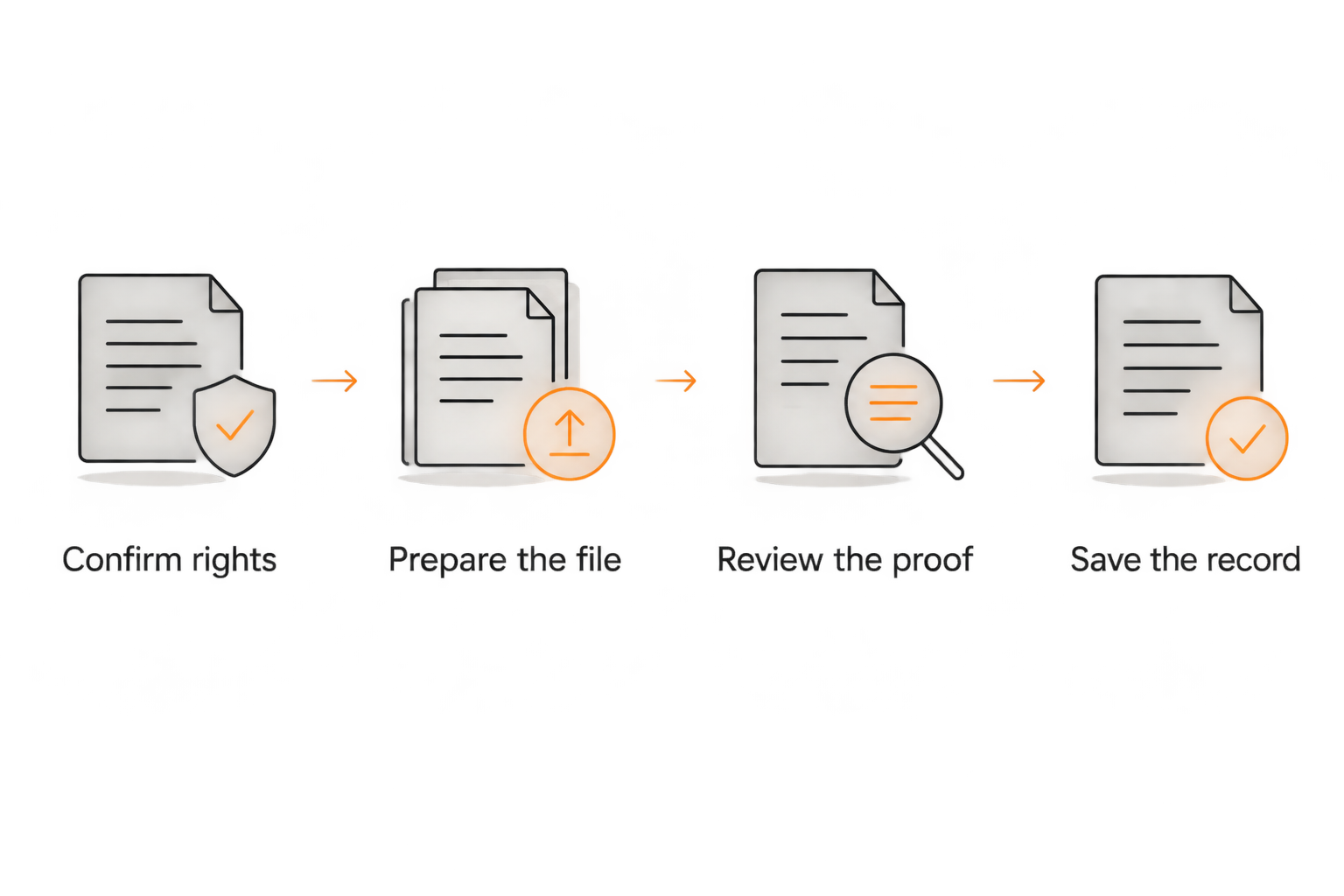
Use this sequence for an ordinary logo, packaging, or giveaway order:
- Confirm the destination. Check the website address, business identity, and contact route before selecting a file.
- Check file-use terms. Read the privacy policy and artwork terms for storage, access, reproduction, and promotional use.
- Confirm artwork rights. Establish that you can reproduce the logo, illustration, photograph, fonts, and other included elements.
- Prepare the file. Export only the design needed for this sticker, following the printer’s artwork requirements.
- Review the proof. Check the content, dimensions, cut line, and intended finish before approval.
- Save the record. Keep the submitted file, approved proof, and order details together.
The artwork-to-approval ordering guide covers the production decisions that follow these checks. Keep upload permission separate from permission to start printing.
Why this matters
A sticker order sends more than an image to a supplier. Your file can contain an unreleased product name, a private address, unused artwork, or a QR destination that was never intended for customers.
For a public logo, the main task is supplying a clean production file and approving the correct design. For unreleased packaging, the decision also involves confidentiality. Do not treat every artwork file as equally sensitive.
Vinylstatus is a fit for small businesses ordering custom stickers from their own artwork. That service does not replace your responsibility to confirm ownership and decide what information you can share.
Check the website before attaching your artwork
Start with the address bar, not the upload button. Check the spelling of the domain and make sure the page belongs to the business you intended to use, especially after following an advertisement or an emailed link.
HTTPS encrypts information in transit between your browser and the website. It does not establish who owns the artwork, promise deletion, or prevent a recipient from using a file after receiving it.
Look for clear answers to practical questions:
- Business identity: Can you identify the company receiving the order?
- Contact route: Can you ask an artwork-handling question before submitting the file?
- Written terms: Are privacy and artwork-use terms accessible before you commit?
- Upload purpose: Is the file being requested for a quote, a proof, or a production order?
- Order access: Who in your business can access the account and approve the design?
Use a unique account password and enable multifactor authentication if offered. Avoid shared logins when different staff members prepare artwork and approve orders; named access makes approval responsibility clearer.
Choose what to upload: production export or editable source
Start with a print-ready export when it meets the printer’s requirements. Keep your editable master in your own storage, and supply additional source material only when a specific production task requires it.
A flattened file is not automatically a good print file. Small text, cut paths, transparency, and color setup still need attention, so follow the requested format rather than flattening everything indiscriminately.
| File option | Best for | Practical benefit | Limitation or risk |
|---|---|---|---|
| Print-ready export | A finalized design that needs reproduction, not redesign | Separates the ordered artwork from your working document | Incorrect export settings can affect text, transparency, or image quality |
| Editable source file | A job requiring agreed artwork changes | Preserves editable objects for adjustments | Can expose unused layers, linked assets, and other working material |
Before uploading, open the exported file independently. Do not assume it matches the design application’s preview.
Remove unused pages and artboards, comments, hidden objects, and unrelated assets. Inspect document properties for unnecessary personal details, and check whether linked images have been included as required. Keep a separate master so cleaning the upload does not destroy your working version.
Check permission before reproducing the design
Possessing an image file does not establish permission to print it. Check the source of each design element before ordering packaging stickers, resale merchandise, or promotional giveaways.
For commissioned artwork, read the agreement with the designer. Confirm that the permitted uses cover the intended sticker application, and distinguish permission to reproduce the finished design from ownership of the editable source files.
For licensed illustrations, stock photography, and fonts, review the applicable license. A license for one use does not establish permission for every other use; resale stickers and product packaging deserve particular attention.
For customer-supplied artwork, record who authorized reproduction and what they authorized. A brief written approval tied to the actual design is clearer than an informal conversation about a different version.
An artwork check is not a legal clearance. A printer checking whether a file can be produced is addressing a different question from whether your business has permission to reproduce it.
Why artwork-upload risk varies
Your 2026 artwork-upload decision should reflect the file’s contents and the order’s purpose. Use these factors to decide whether ordinary order checks are enough or whether you need written answers first:
- Public versus unreleased artwork: An existing public logo and confidential launch packaging present different disclosure concerns.
- File contents: A clean production export shares less working material than a document containing unrelated designs and notes.
- Permission to reproduce: Original artwork, commissioned designs, and licensed assets require different ownership or license checks.
- File-use terms: Storage, third-party processing, and promotional-use provisions affect what happens after submission.
- Approval access: Shared accounts and unclear responsibilities make it harder to establish which version was authorized.
- Printed content: Private addresses, restricted QR destinations, and internal references need attention before they become physical stickers.
Do not solve a confidentiality problem by merely reducing image quality. A low-resolution preview can still reveal a product name, campaign concept, or unreleased design.
What should you ask before uploading confidential artwork?
For an unreleased product or client project, ask about handling before sending the file. Describe the concern without attaching the confidential artwork to the initial message.
For a Vinylstatus order, use the contact page to ask the questions relevant to your project:
- Who can access uploaded artwork during quoting, proofing, and production?
- Are files shared with outside production or service providers?
- How long are files retained, and how do deletion requests work?
- Can submitted artwork appear in marketing, samples, or a public portfolio?
- Can confidentiality requirements be agreed before submission?
Keep the written response with your order records. If the proposed handling conflicts with a client agreement or launch restriction, resolve that conflict before uploading—not after approving a proof.
A deletion request is also a separate issue from order cancellation. Ask what deletion covers, including account files, production copies, and backups, rather than assuming cancellation removes every copy.
Keep packaging information out of the wrong file
Before sending a packaging design, separate what belongs on the finished sticker from what belongs in your internal notes. A customer-facing label needs approved content; it does not need supplier comments, draft claims, or private launch instructions embedded in the artwork.
Whether you are ordering stickers or custom label printing, separate the handling question from the production specification: size and material describe the printed item, not how the artwork can be stored or reused.
Use a release-ready copy for production. If a packaging claim, ingredient statement, address, or product name is awaiting approval, settle it before authorizing print rather than expecting the printer to identify the unresolved issue.
QR codes deserve the same treatment. Scan the actual exported code and confirm that it opens the intended public destination, not a staff-only document, test checkout, or private preview page. Inspect the destination itself, not just whether the camera recognizes the code.
Review the proof as a production decision
Proof approval authorizes a specific version, not the general idea of your design. Compare the proof with the exported file and your order specifications instead of approving it from memory.
Check these items before you approve:
- Content: Spelling, logo version, contact details, and required wording.
- Size: Finished dimensions and readability at the intended physical size.
- Cut line: The shape, border spacing, and clearance around small details.
- Finish: Whether matte, glossy, or holographic treatment suits the artwork and use.
- QR function: Destination, contrast, quiet zone, and a real scan at the intended size.
- Quantity: The number needed for the approved use, not an outdated draft order.
For your 2026 order, save 1 print-ready file, 1 approved proof, and 1 order record together. These are recordkeeping recommendations, not technical upload limits; retain earlier versions separately if your business needs a revision history.
Give the approved file a name that distinguishes it from drafts. Include the relevant size or design identifier in your internal record so a reorder does not depend on someone recognizing a thumbnail.
Do not use a screen proof as a physical sample. A screen cannot reproduce the feel of the liner, the application surface, or the appearance of a reflective finish under every lighting condition.
Does uploading artwork mean I have approved printing?
Uploading a file and approving production are different actions. Read the order workflow so you know which button or written response authorizes printing, and whether later changes require a revised proof.
For a team order, assign one approval owner. Other people can check spelling, branding, and packaging content, but the person authorizing production should confirm that those checks refer to the same proof.
Can I upload a client’s logo for stickers?
Upload a client’s logo when you have authorization to reproduce it for the intended order. Confirm the approved version, quantity, use, and any confidentiality restrictions before sharing the file with a printer.
Keep that authorization with the artwork record. Permission to create a packaging mockup does not, by itself, establish permission to print giveaway stickers or merchandise.
Is a watermarked preview safer than a print-ready file?
A watermarked preview identifies a review copy, but it still reveals the visible design. It is not a substitute for agreed confidentiality terms, and it is not the file to approve for clean production.
Use previews for clearly defined discussions. When you are ready to print, supply the required production file through the agreed order process and review the resulting proof.
FAQ
Is it safe to upload my business logo for custom stickers?
Yes, when you have confirmed the recipient, reviewed relevant file-use terms, and established permission to reproduce the logo. Send a clean production file rather than an entire working folder.
Does HTTPS mean my uploaded artwork is confidential?
No. HTTPS protects information in transit, but confidentiality also depends on access, storage, sharing, and permitted use after receipt.
Should I upload an editable file or a print-ready export?
Use a print-ready export when it meets the printer’s requirements. Supply editable source material only when an agreed artwork task requires it, and remove unrelated content first.
Can a printer use my sticker design in its marketing?
Check the printer’s artwork and promotional-use terms before uploading. If your design is confidential or restricted, obtain a written agreement addressing that use before sharing it.
What should I check on a custom sticker proof?
Check the design version, wording, finished size, cut line, border spacing, finish, and any QR destination. Approve only the proof that matches the order you intend to receive.
Can I request deletion of uploaded sticker artwork?
Ask the printer how deletion requests work and what records or copies they cover. Do not assume that canceling an order also deletes uploaded artwork, production files, or backups.
One last thing
The wrong approved file is still the wrong file, even when it reaches the printer securely. Before placing a Vinylstatus sticker order in 2026, open the exact attachment you are sending—not the nearby master file—and inspect it once more.
Make the approved production file easy to identify and the obsolete draft hard to select. That simple recordkeeping step connects your upload, proof, and eventual reorder.
Related guides
- How to size a custom logo sticker for your product
- Custom die-cut stickers for packaging: shapes, sizes, and quantity
- QR code stickers for retail packaging, reviews, and reorders