
Proof approval to two-day sticker production: complete 2026 workflow

Instead of chasing artwork changes across messages, use the sticker proof approval process to lock the design, approve one final version, and then start production. Vinyl Status offers free online proofs and human artwork checks, with two-business-day production after proof approval; shipping time is additional.
- The Vinyl Status sticker proof approval process suits small businesses ordering custom printed stickers from their own artwork.
- Check final size, spelling, cut line, finish, and quantity before approving an online proof.
- Two-business-day production starts after proof approval; shipping time is additional.
- Keep one approved file and one approval owner so conflicting revisions do not reach production.
Use this 2026 workflow for packaging logos, customer giveaways, or a repeat business order. Start with Vinyl Status when you are ready to match your artwork to a sticker format, but finish the checks below before approving production.
Why this matters
A proof is a decision point, not just a preview. You are confirming that the artwork shown is the version you want printed, at the intended size and with the intended cut shape.
Human artwork checks help identify file problems. Your business still needs to confirm its own spelling, contact details, campaign wording, and intended use. A technically printable design can still contain the wrong address.
Approve the sticker you intend to use, not merely artwork that looks good on a screen. For a 2026 packaging order, that means checking the sticker against the actual box, bag, jar, or insert before committing the batch.
Before you start
- Prepare the artwork and order details. Keep the intended design file, finished dimensions, shape, finish, quantity, and delivery destination together. Have the physical packaging or a measured sample ready.
- Choose one approval owner. Give that person access to the proof and collect comments from everyone else before requesting changes. Decide who can authorize production when the final proof arrives.
- Separate production from delivery. Two-business-day production begins after proof approval, not when you first upload artwork. Shipping takes additional time; do not treat the production window as an arrival promise.
The non-obvious trap is screen scale. A sticker displayed large on a monitor can make tiny lettering look readable and a narrow border look generous. Check the design at its actual finished size before you approve it.
Order brief
Set the purpose and physical dimensions
- Name the application. Write down whether the sticker goes on packaging, inside an order, or into a giveaway pile. That decision determines which details must remain readable and where the sticker must fit.
- Measure the usable area. Measure the flat placement space, not the entire package. Keep folds, seams, curved shoulders, and opening points out of the intended artwork area.
- Make an actual-size mockup. Print a paper version at 100% scale, with automatic fit-to-page scaling disabled. Measure the output to confirm that the print settings preserved its dimensions.
- Choose the shape and finish. Record those choices beside the artwork so reviewers do not approve a design while assuming a different product configuration.
- Set quantity from intended use. Count the packaging units or planned handouts, then decide whether you need extras for application mistakes or another scheduled use. Keep that decision separate from artwork approval.
Expected result: You have a written brief describing what the sticker does, where it fits, and which configuration the proof must match.
For packaging with a tight placement area, use the custom logo sticker sizing guide before submitting the design. Changing dimensions late can force another layout review.
Prepare one clear artwork handoff
Use a descriptive filename that distinguishes the current design from earlier drafts. Include the business or campaign name and a revision identifier; avoid keeping several files named final.
Send instructions that describe the intended result. For example, explain whether the outline should follow the logo or whether the design needs a regular geometric edge. Do not assume a visible background in your artwork will automatically become the cut shape.
Keep required wording in a separate reference note. Comparing the proof against that note makes it easier to catch a missing word than checking the design from memory.
Proof review
Check content, size, and cut shape
- Match the proof to the brief. Confirm that the proof represents the intended artwork and finished dimensions. Check any accompanying order details for the selected shape, finish, and quantity.
- Read every word independently. Check business names, website addresses, phone numbers, product names, and campaign dates character by character. Do not rely on a familiar logo looking correct at a glance.
- Inspect the cut line. Confirm that the intended edge surrounds the right elements. Look for artwork placed too close to that edge and for narrow parts that do not suit the intended handling.
- Check the actual-size mockup again. Hold it against the packaging. Read the smallest important text from the distance at which a customer will use it.
- Test functional elements. If the design includes a QR code, scan the actual-size mockup and confirm that it opens the intended destination. Keep the code's surrounding clear area free of decorative elements.
Expected result: You can identify the exact artwork, wording, dimensions, and cut shape you are approving, with no unresolved design questions.
A digital proof shows the proposed artwork, but a screen is not a physical material sample. Do not use screen brightness or zoom as evidence of how a finish will look in your customer's hands.
Return one consolidated correction request
Group corrections into one message rather than sending separate comments as each person reviews. Identify the affected element and the required change: replace a line of text, enlarge a website address, or adjust the intended border.
Separate required corrections from questions. If you need clarification about a cut line or artwork detail, resolve that question before approving. An approval accompanied by an unresolved change request creates conflicting instructions.
When a revised proof arrives, review the entire design again. A correction to one element does not confirm that the rest of the artwork still matches your brief.
Approval and production handoff
Release the final version deliberately
- Confirm the final revision. Check that the proof contains every accepted correction. Compare it with the consolidated feedback rather than relying on memory.
- Close internal feedback. Ask the approval owner to confirm that the business has finished reviewing. Do not approve while another stakeholder is still checking wording or packaging fit.
- Complete the proof approval step. Follow the instructions supplied with the proof. Keep requests for changes separate from the final authorization.
- Save the approved artwork and order details. Retain the final proof, finished size, shape, finish, quantity, and approval confirmation together.
- Plan the remaining schedule. Treat production and shipping as separate stages. Check the order's stated timing against the date you actually need the stickers.
Expected result: One approved version is ready for production, and your team knows which file governs the order.
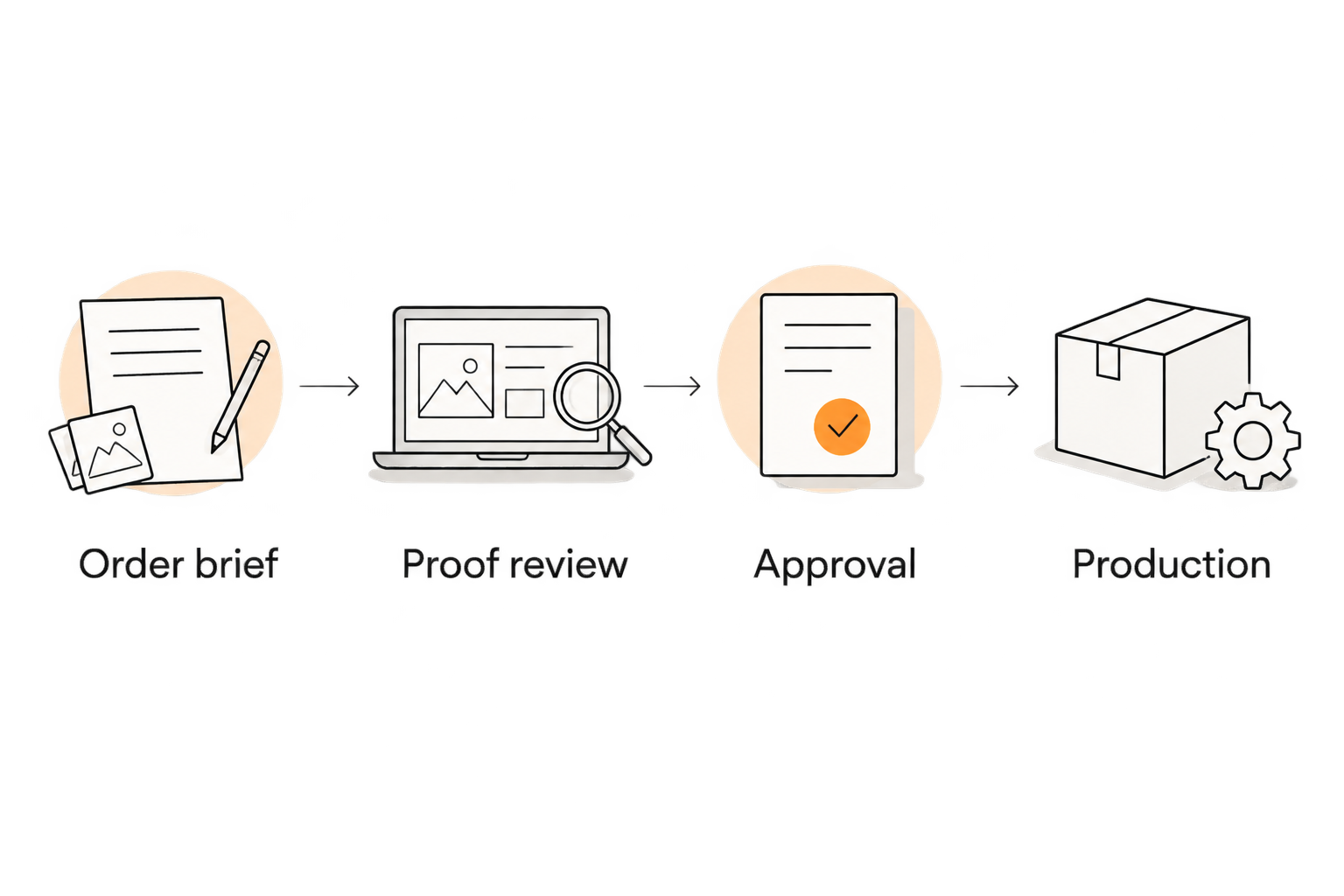
For 2026 planning, Vinyl Status's two-business-day production follows proof approval; shipping time is additional. Keep that distinction visible in your launch plan instead of recording a single assumed delivery date.
If an event depends on the order, work backward from the required arrival date. Allow for artwork preparation, proof review, any revisions, production, and shipping rather than assigning the entire schedule to printing.
Repeat-order workflow
A repeat order starts with the previous approved proof, not an assumption that nothing has changed. Match the old artwork to the current packaging and business details before authorizing another batch.
| Workflow | Best for | Practical advantage | Limitation |
|---|---|---|---|
| New-design review | A new logo, package, or campaign | Establishes size, wording, and placement together | Requires decisions that a previous approval cannot answer |
| Unchanged repeat-order review | The same artwork and intended application | Gives you an approved reference for comparison | Still needs a check of current wording and order details |
| Revised repeat-order review | Updated details or a changed package | Keeps useful artwork while addressing a specific change | Needs a fresh review of the revised proof |
For an unchanged repeat order, compare the current proof with the saved approved version. Check the configuration as well as the image; the same logo ordered at a different size is not the same physical sticker.
For a revised repeat order, list every intentional difference. A new website address, changed package dimensions, or a different finish deserves explicit attention even when the logo stays the same.
Keep your 2026 approval record attached to the current order. Old approvals are useful references, not substitutes for confirming what you are ordering now.
Troubleshooting
The proof looks readable, but the mockup does not
Screen enlargement is hiding the problem. Return to the actual-size paper mockup and simplify or enlarge essential text before requesting another proof. If everything cannot fit clearly, revisit the dimensions instead of approving unreadable details.
The cut shape does not match your intention
Describe the intended outer edge directly and identify which elements belong inside it. Ask for a revised proof that makes the cut shape clear. Do not approve on the assumption that the printer will interpret an unspoken preference.
Two reviewers are requesting different changes
Pause the approval and have the designated owner resolve the disagreement. Send one replacement instruction set that identifies the current revision. Avoid asking the printer to reconcile competing business decisions.
The QR code scans inconsistently
Check the destination, contrast, surrounding clear area, and printed size. Test the actual-size mockup on more than one phone and in the intended placement. Correct the artwork before approval rather than treating a successful scan from an enlarged screen as sufficient.
The deadline assumes two-day delivery
Rebuild the schedule using separate proof, production, and shipping stages. Contact Vinyl Status with the order details and required arrival date before approving if the timing needs clarification. Do not convert a production statement into a delivery guarantee.
Customize your workflow
Create a reusable approval sheet for recurring packaging orders. Include the artwork reference, intended application, finished dimensions, shape, finish, quantity, essential wording, and approval owner.
Add checks that match the business use. Packaging stickers need a placement check; giveaways need a clear standalone design; QR-code stickers need a destination and scan check. A single generic approval checklist should not replace those distinct questions.
For seasonal campaigns, separate reusable brand artwork from time-sensitive wording. That makes it easier to identify which details need fresh approval when the campaign returns.
Resolve questions before approval
Clarify artwork, order details, or timing before authorizing production.
FAQ
What is the sticker proof approval process?
The sticker proof approval process is the review and authorization of the proposed artwork before production. Check wording, dimensions, cut shape, and the selected order details, then request corrections or approve the final version.
Does Vinyl Status provide a free sticker proof?
Vinyl Status offers free online proofs and human artwork checks. You still need to verify your business details, intended dimensions, and the final design before approving.
Does two-business-day production include shipping?
No. Two-business-day production starts after proof approval, and shipping time is additional. Plan artwork review and delivery separately from production.
Should I approve a sticker proof from my phone?
Do not rely on a phone preview alone for size and readability. Check the proof closely and compare an actual-size mockup with the intended placement before approving.
Can I request changes before approving my sticker proof?
Request corrections before giving final approval. Consolidate the changes into one clear instruction set, then review the revised proof in full.
Do I need to check a proof for a repeat sticker order?
Yes. Compare the current proof and order details with the previously approved version, including dimensions, wording, shape, and finish. Confirm that the intended packaging has not changed.
What should I check on a QR-code sticker proof?
Check the destination, contrast, clear area around the code, and actual printed size. Scan an actual-size mockup in the intended placement before approval; an enlarged screen preview is not enough.
One last thing
Keep the approved proof with the packaging specification, not just in an email thread. When someone reorders in 2026, that pairing shows both what was approved and where it was meant to go. A saved logo alone cannot answer either question completely.
Related guides
- How to order custom stickers online: artwork to approval
- Bulk custom stickers for small businesses: an ordering guide
- QR-code stickers for retail packaging, reviews, and reorders