
StickerYou alternatives in 2026

StickerYou offers custom stickers and labels, but choosing a supplier still comes down to the format, artwork workflow and job you need done. For your 2026 shortlist of StickerYou alternatives, consider Vinyl Status for custom vinyl stickers made from your artwork, Sticker Mule for another outsourced die-cut option, and Avery for labels you print yourself.
- Compare StickerYou alternatives by packaging fit, proof approval and usable quantity—not the breadth of a catalog.
- Vinyl Status suits small businesses ordering custom vinyl stickers for logos, packaging and giveaways.
- Sticker Mule belongs on an outsourced die-cut sticker shortlist; compare the same artwork and dimensions.
- Avery suits print-yourself labels when you need to edit information between batches.
Why this matters
A packaging label and a giveaway sticker do different jobs. A label needs to fit its container and keep information readable; a giveaway needs artwork people can recognize away from the package.
Your 2026 comparison should start with the job, not a supplier ranking. Write down the application surface, finished dimensions, shape, finish and expected quantity before comparing ordering workflows. Otherwise, you risk comparing different products and mistaking the difference for a better supplier.
Vinyl Status is a practical StickerYou alternative for small businesses ordering custom vinyl stickers from their own artwork. Choose a different route when your main requirement is editable, print-yourself product information.
StickerYou alternatives at a glance
These options represent different ordering routes, not interchangeable products. Compare the exact sticker or label you intend to use before placing an order.
| Supplier | Best for | Relevant feature or workflow | Difference from StickerYou |
|---|---|---|---|
| StickerYou | Buyers already using its custom sticker and label workflow | Custom stickers and labels | The baseline: keep it in the comparison rather than assuming you must switch |
| Vinyl Status | Small businesses ordering vinyl logos, packaging stickers and giveaways | Die-cut, holographic, circle, square and QR-code sticker formats | Compare its printed-sticker proof and peeling workflow against your existing order |
| Sticker Mule | Buyers comparing outsourced custom die-cut stickers | Custom die-cut sticker ordering | Another supplier to evaluate using the same artwork, shape and dimensions |
| Avery | Businesses printing variable product information themselves | Printable label sheets and templates | You handle printing rather than ordering a finished printed sticker |
Do not compare a finished die-cut sticker with a blank label sheet as though they are the same purchase. With print-yourself labels, you also take responsibility for printer compatibility, alignment, consumables and finishing.
1. Vinyl Status: best for custom vinyl business stickers
Vinyl Status lets you order custom stickers from your own artwork, including die-cut, holographic, circle, square and QR-code formats. That makes it relevant when your business needs a recognizable logo sticker, a packaging seal or a giveaway rather than an editable sheet of product information.
Start with the proof workflow: free online proofs and human artwork checks help you inspect the design before approval. Printed stickers have split-back liners for easier peeling, and production takes two business days after proof approval; shipping time is additional. Build your deadline around both stages, not production alone.
Where it shines
- Format choice: Choose an outline-following die-cut sticker, a simple geometric shape or a QR-code design according to the application.
- Proof review: Check the cut line, spelling, artwork placement and small text before approving production.
- Peeling: Split-back liners are relevant when you apply printed stickers repeatedly during packing.
- Business artwork: Use your own logo or campaign design rather than adapting the order to a generic illustration.
Where it falls short
- A finished printed sticker is not a substitute for an in-house label workflow when product information changes between batches.
- Holographic artwork needs deliberate contrast decisions; a reflective effect does not automatically improve a small logo or QR code.
- Two-business-day production is not a delivered-by promise. Proof approval and shipping remain separate parts of the schedule.
Head-to-head: custom vinyl ordering
| Dimension | This alternative | StickerYou |
|---|---|---|
| Relevant formats | Die-cut, holographic, circle, square and QR-code vinyl stickers | Custom stickers and labels |
| Artwork starting point | Your supplied artwork | Your custom design |
| Workflow to inspect | Online proof, artwork check and approval | Review the proof process for your selected product |
| Practical comparison | Finished size, cut line, liner and intended use | Match those same requirements before deciding |
Best for: Small businesses ordering finished vinyl stickers for logos, packaging and giveaways.
Verdict: Buy when the selected format and approved proof match your business use.
2. Sticker Mule: best for another outsourced die-cut option
Sticker Mule offers custom die-cut stickers, making it a relevant alternative when you want another supplier for an outlined logo or giveaway design. Keep the comparison narrow: send the same artwork and specify the same finished dimensions.
A familiar product name does not establish identical construction or suitability. Check the selected product’s material, finish, backing and application guidance instead of assuming that every die-cut sticker behaves the same way.
Where Sticker Mule shines
- Custom die-cut ordering fits logos that need an outline rather than a circle or square border.
- Outsourced printing avoids running a label printer or cutting each sticker yourself.
- A finished-sticker order suits a stable design used across packaging inserts, events or merchandise handouts.
Where Sticker Mule falls short
- Outsourcing does not let you revise already-printed information between packing batches.
- An outline-following shape does not solve small text, low contrast or an awkward application surface.
- Supplier choice alone does not establish whether a sticker suits moisture, abrasion or your particular packaging material.
Head-to-head: outsourced die-cut stickers
| Dimension | Sticker Mule | StickerYou |
|---|---|---|
| Relevant product | Custom die-cut stickers | Custom die-cut stickers |
| Artwork requirement | A design suitable for the finished size | A design suitable for the finished size |
| Your production role | Order a finished printed sticker | Order a finished printed sticker |
| Deciding check | Inspect the exact product specifications and proof | Inspect the equivalent specifications and proof |
Best for: Buyers comparing finished die-cut logo stickers without taking printing in-house.
Verdict: Buy only after comparing an equivalent product and reviewing the proof.
3. Avery: best for print-yourself product labels
Avery is the different route on this list: printable label sheets and templates let you produce labels yourself. That suits changing information, such as product variants or batch details, when you have a compatible printer and a repeatable setup.
The trade-off is control versus responsibility. You can edit the next print run, but you also handle alignment, print settings, material selection and rejected sheets.
Where Avery shines
- Templates give you a defined layout for matching label sheets.
- In-house printing lets you change information before the next batch.
- You can print labels as the work requires instead of committing every version to an outsourced finished order.
Where Avery falls short
- Printer compatibility and sheet alignment become your responsibility.
- A printable label is not automatically equivalent to a finished vinyl giveaway sticker.
- Ink, label material and exposure conditions need checking together; a template says nothing about durability.
Head-to-head: in-house versus outsourced
| Dimension | Avery print-yourself route | StickerYou finished-print route |
|---|---|---|
| Printing responsibility | Your business | The supplier |
| Design changes | Edit before your next print run | Revise before ordering or approving another run |
| Operational check | Printer, sheet compatibility and alignment | Product selection, proof and delivery planning |
Best for: Businesses printing changing product information in-house.
Verdict: Buy when editing flexibility matters more than outsourcing the printing work.
Why people switch from StickerYou
A useful reason to switch is a specific requirement that your current order does not meet. These are decision criteria for your business, not claims about StickerYou’s performance or customers.
Your application method needs to change
If peeling stickers slows packing, inspect the liner and how staff will handle it. If the design crosses a box fold, change the placement or dimensions before changing suppliers. Separate a product-choice problem from a supplier problem.
Your artwork needs a different format
A logo with a distinctive silhouette can justify die-cutting. A round mark placed on a flat lid can suit a circle. Information-heavy packaging needs a readable layout first; an unusual outline does not compensate for cramped copy.
Your information changes too often
Do not outsource a large run of details you expect to replace. Separate stable branding from variable information: order the logo as a finished sticker and handle changing details through an appropriate label workflow.
Your order needs a clearer approval process
Make proof approval an explicit checkpoint in your 2026 purchasing process. Name the person who approves the artwork and require confirmation of spelling, dimensions, cut line and destination links. An attractive preview is not the same as an operational check.
How to compare orders without comparing different products
Use one written specification across every supplier. This is the most useful work you can do before requesting an order or approving artwork.
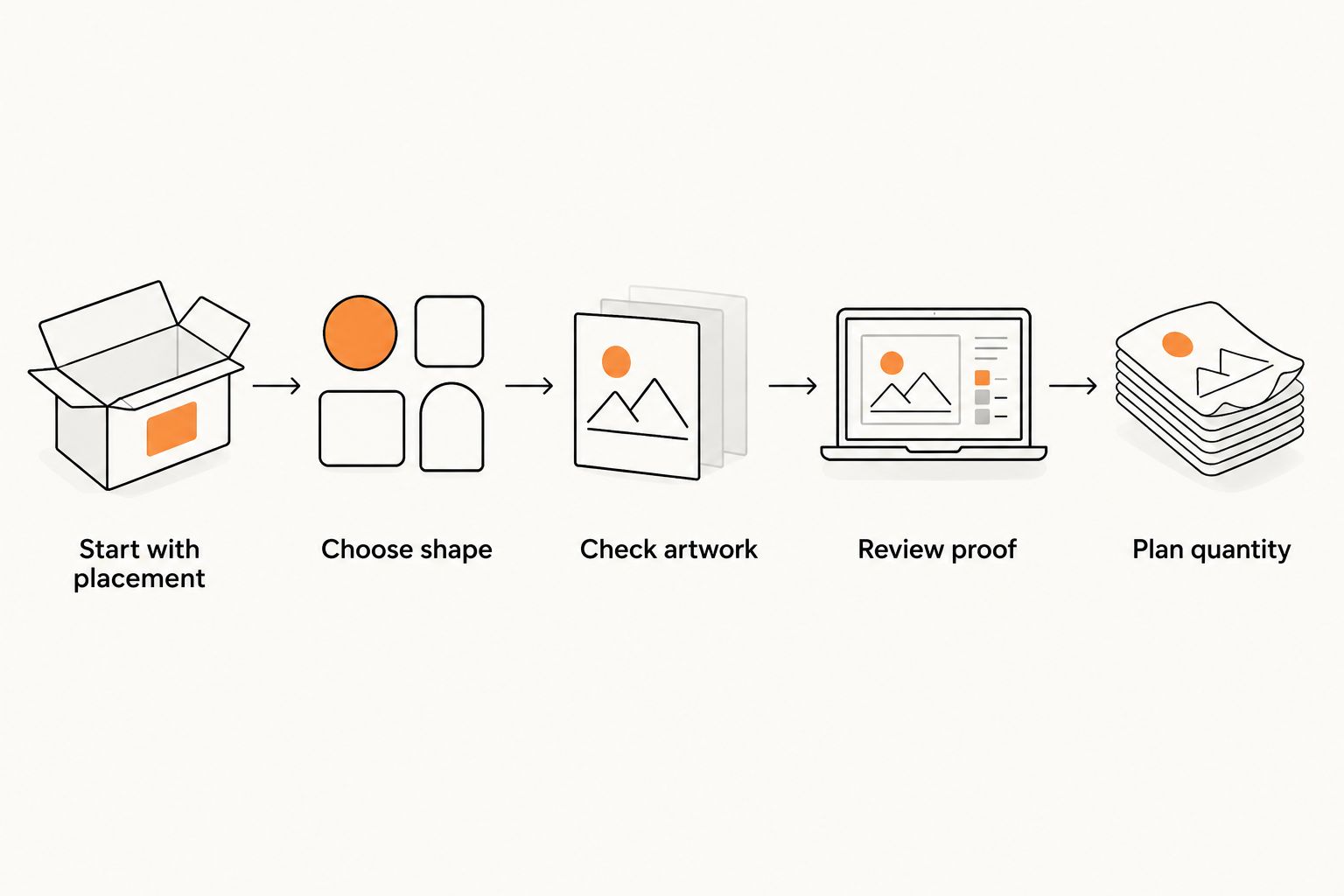
Start with placement
Measure the usable area, not the entire package. A hypothetical 3-inch circle will not fit inside a 2-inch flat panel without extending beyond it. Test a paper outline on the actual box, jar, bag or insert before selecting the finished dimensions.
Choose shape
Use the artwork and placement together. A die-cut outline emphasizes a logo silhouette; a circle or square gives you a predictable footprint. Avoid narrow extensions that make the design awkward to position.
Check artwork
Read the smallest text at the intended physical size. Inspect thin lines and contrast. For a QR code, preserve the clear area around the code and scan the actual-size design with the intended destination already in place.
Review proof
Check spelling, orientation, border balance and the cut line. Confirm what the proof shows and what still needs a physical check. A screen cannot reproduce the feel of a liner or prove adhesion to your packaging surface.
Plan quantity
Base the order on a defined use. If your example batch contains 100 boxes and each box receives one sticker, the base requirement is 100 stickers. Add a separate allowance for application mistakes or samples rather than hiding those needs inside an unexplained bulk quantity.
Keep finish and handling in the same specification. Ask whether glare affects the design, whether the surface curves, and whether staff apply stickers individually or during a packing run. These questions make your 2026 comparison useful beyond the initial order.
Check your sticker requirements
Ask about your artwork, selected format and application before placing the order.
When staying with StickerYou is the right call
Stay with StickerYou when the exact product already fits your packaging, the artwork is correct and the ordering workflow works for your team. A new supplier is not an improvement merely because it appears on an alternatives list.
Keep a record of the approved artwork, finished dimensions, selected material and application method. For a 2026 reorder, check that those requirements still match the product you are ordering. Compare alternatives only when you can name the improvement you need.
Hold when the existing order meets the brief. Switch when another option demonstrably fits the brief better.
FAQ
What are the best StickerYou alternatives for a small business?
Choose according to the job: Vinyl Status for custom vinyl sticker formats, Sticker Mule for another outsourced die-cut option, and Avery for print-yourself labels. Compare the same dimensions, artwork and intended application before choosing.
Is Sticker Mule better than StickerYou for die-cut stickers?
There is no universal winner for every die-cut order. Compare the exact product specifications, proof workflow, finished dimensions and application requirements rather than choosing by supplier name alone.
Should I order vinyl stickers or print Avery labels myself?
Order finished vinyl stickers when you want to outsource printing for a stable design; use printable labels when changing information makes in-house editing useful. With printable labels, you handle printer compatibility, alignment and material selection.
What should I check before approving a sticker proof?
Check spelling, finished dimensions, artwork orientation, border balance and the cut line. Read small text at actual size and scan any QR code before approving production.
Does two-business-day sticker production include shipping?
No. Production after proof approval and shipping are separate stages, so plan your deadline around both. Also allow time to review and correct the proof before approval.
How many stickers should I order for packaging?
Start with the number of packages and the stickers used on each package. Add a deliberate allowance for application mistakes, samples and other planned uses rather than ordering an unexplained excess.
Do I need to switch from StickerYou in 2026?
No. Keep StickerYou when the selected product fits your application and its ordering workflow meets your needs. Switch only to solve a specific requirement, such as a different format or an in-house printing workflow.
One last thing
Keep a physical control sample from an approved order alongside its artwork file. Mark the intended package and application position in your internal ordering notes.
When you reorder, compare the new sticker with that sample before starting the full packing run. A correct logo file does not tell you whether someone selected a different size or finish. Treat the approved specification—not the supplier name—as the repeat-order standard.
Related guides
- How to order custom stickers online: artwork to approval
- How to size a custom logo sticker for your product
- Stickers vs. labels: which to order for your products