

Vinyl Disorder alternatives in 2026

Vinyl Disorder offers custom stickers and decals, so the useful question is which supplier fits your next business order. Among Vinyl Disorder alternatives in 2026, choose Vinyl Status for custom printed stickers from your artwork, consider StickerApp for material-led designs, or choose a local print shop when an in-person packaging check is essential.
- Vinyl Status is a Vinyl Disorder alternative for small businesses ordering custom printed stickers from their own artwork.
- Compare sticker suppliers using the same artwork, dimensions, finish and quantity.
- Separate production after proof approval from shipping time when planning a deadline.
- Choose StickerApp for material-led projects; assess a local print shop when physical packaging fit matters most.
Why this matters
A replacement supplier needs to solve an ordering problem, not just offer another upload button. Your logo must fit the package, small lettering must remain readable, and the finished sticker must suit its intended use.
For a 2026 supplier comparison, start with one written specification. Describe the surface, finished dimensions, shape, finish, artwork version and quantity. Otherwise, you risk comparing different products and choosing an order that does not do the job.
The ceiling is your requirement: a familiar supplier stops being enough when its confirmed options or ordering process do not meet that requirement. That is a reason to compare alternatives, not evidence that the supplier is poor.
Vinyl Disorder alternatives at a glance
This comparison separates each option's role from the checks you still need to make. A supplier name is not a specification. Confirm the selected product before approving an order.
| Option | Best for | Defining feature | Difference to assess against Vinyl Disorder |
|---|---|---|---|
| Vinyl Disorder | Buyers whose existing sticker or decal specification already works | Custom stickers and decals | Use the current specification as your benchmark |
| Vinyl Status | Small businesses ordering printed stickers for logos, packaging and giveaways | Die-cut, holographic, circle, square and QR-code sticker formats from your artwork | Compare proof handling, format, peeling and production timing |
| StickerApp | Buyers making material appearance part of the design | Custom stickers with material choices | Compare the exact material and artwork treatment, not just shape |
| Local print shop | Buyers needing an in-person discussion about packaging fit | The option to discuss the physical package with a nearby supplier | Confirm which sticker work the shop actually produces and supports |
Keep packaging stickers and giveaway stickers separate in your comparison. A simple shape that sits neatly on a jar serves a different purpose from a contour-cut logo handed out at an event.
1. Vinyl Status: best for business sticker orders
Vinyl Status is an online print shop for custom stickers made from your artwork, including die-cut, holographic, circle, square and QR-code formats. Vinyl Status is a practical alternative for small businesses ordering logo, packaging and giveaway stickers.
Start with free online proofs and human artwork checks. For printed stickers, the stated production timing is two business days after proof approval, with shipping time additional; split-back liners make peeling easier. Confirm that these details apply to your selected format before scheduling a packing run.
Where it shines
- Artwork review: Use the proof stage to check the cut line, spelling, border and finished dimensions before approval.
- Format choice: Match a circle or square to a defined packaging area, or use die-cut stickers when the logo outline matters.
- Handling: Split-back liners on printed stickers help when staff need to peel and apply stickers during packing.
- Business use: Plan separate artwork or quantities for packaging, giveaways and QR-code destinations rather than treating them as one job.
Where it falls short
- A digital proof cannot show actual surface adhesion or reproduce physical glare. You still need to assess the intended package and finish.
- Production starts after approval. Time spent correcting artwork comes before that production window, and shipping comes after it.
- Several suitable shapes do not remove the sizing decision. You must measure the usable area rather than order by how large the artwork looks on screen.
Head-to-head ordering checks
| Dimension | This alternative | Vinyl Disorder benchmark |
|---|---|---|
| Business formats | Die-cut, holographic, circle, square and QR-code stickers are named options | Compare the exact corresponding sticker or decal format |
| Proof process | Free online proofs and human artwork checks | Confirm the proof and revision process for your selected item |
| Production planning | Two business days after proof approval for the stated printed-sticker workflow; shipping is additional | Confirm the production start point and delivery estimate |
| Application | Split-back liners on printed stickers | Check the liner supplied with the product you are comparing |
Before uploading, read the artwork-to-approval ordering guide. Use it to prepare the file and review the proof deliberately, rather than approving a preview because the colors look familiar.
Best for: Small businesses with finished artwork and a defined packaging or giveaway use.
Verdict: Buy when the selected format and approved proof match your written specification.
2. StickerApp: best for material-led sticker designs
StickerApp is a custom sticker supplier with material choices, including holographic stickers. Put it on your shortlist when the material's appearance is central to the design, rather than an optional finishing decision.
A reflective effect does not replace readable artwork. Compare the material treatment with the message you need customers to see, especially when a sticker carries fine lettering or a QR code.
Where it shines
- Material choice gives you a clear comparison point for artwork built around a visual effect.
- A custom sticker workflow suits a business ordering its own logo or illustration rather than selecting a preprinted design.
- A material-led shortlist keeps the discussion focused: decide the appearance first, then compare shape, dimensions and artwork handling.
Where it falls short
- A material effect cannot fix cramped text, a weak cut line or an unsuitable package location.
- An on-screen preview is not a physical demonstration of glare under your shop or event lighting.
- Choosing by appearance alone leaves important questions unresolved, including peeling, application and the delivery schedule.
Head-to-head ordering checks
| Dimension | StickerApp | Vinyl Disorder benchmark |
|---|---|---|
| Primary selection question | Which material suits the artwork? | Does the selected sticker or decal meet the same visual brief? |
| Artwork review | Check how the design uses the chosen material | Review the equivalent artwork treatment |
| Business fit | Assess readability and packaging placement | Apply the same readability and placement checks |
Best for: Businesses whose sticker concept depends on the material's appearance.
Verdict: Hold until the material treatment and artwork work together at the finished size.
3. Local print shop: best for an in-person packaging check
A local print shop is an alternative buying route, not a standardized product. Consider it when bringing in the actual box, jar, pouch or bottle would resolve a sizing or placement question.
Confirm sticker capabilities before committing. A nearby supplier is useful only if it can provide the shape, material and ordering support your job requires.
Where this option shines
- You can ask whether an in-person appointment is available and bring the actual package.
- A physical discussion makes it easier to point out seams, curves, lid edges and restricted placement areas.
- You can explain application conditions directly rather than relying on a short upload note.
Where this option falls short
- Capabilities differ between shops; do not assume every location offers custom contour cutting or holographic materials.
- Proximity alone says nothing about proof quality, production timing or suitability for your surface.
- An in-person conversation still needs a written specification and approved artwork.
| Dimension | Local print shop | Vinyl Disorder benchmark |
|---|---|---|
| Main reason to choose | A physical packaging discussion, if offered | Assess whether the online ordering process resolves the same questions |
| Product selection | Confirm the shop's actual sticker capabilities | Compare the equivalent sticker or decal specification |
| Approval | Put agreed dimensions and artwork in writing | Keep the same approval discipline |
Best for: Businesses that need to resolve package fit in person before ordering.
Verdict: Buy only after the shop confirms the required product and approval process.
Why people switch from Vinyl Disorder
A useful reason to switch is a specific unmet requirement. For your 2026 order, write down that requirement before contacting another supplier; otherwise, the same problem follows the artwork to the next checkout.
These are decision criteria, not claims about Vinyl Disorder's service history:
- Shape: You need a different cut outline or a simpler shape for the packaging area.
- Material: The design depends on an appearance that must be assessed separately from ordinary printed artwork.
- Proof handling: You need a clear opportunity to correct dimensions, spelling or cut placement before approval.
- Application: Staff need a liner arrangement that suits repeated peeling during packing.
- Scheduling: You need to distinguish artwork review, production and shipping rather than treat them as one interval.
Do not switch solely because another supplier shows a more attractive example image. Send the same artwork and specification to each supplier, then compare the actual ordering details.
Check the sticker before changing suppliers
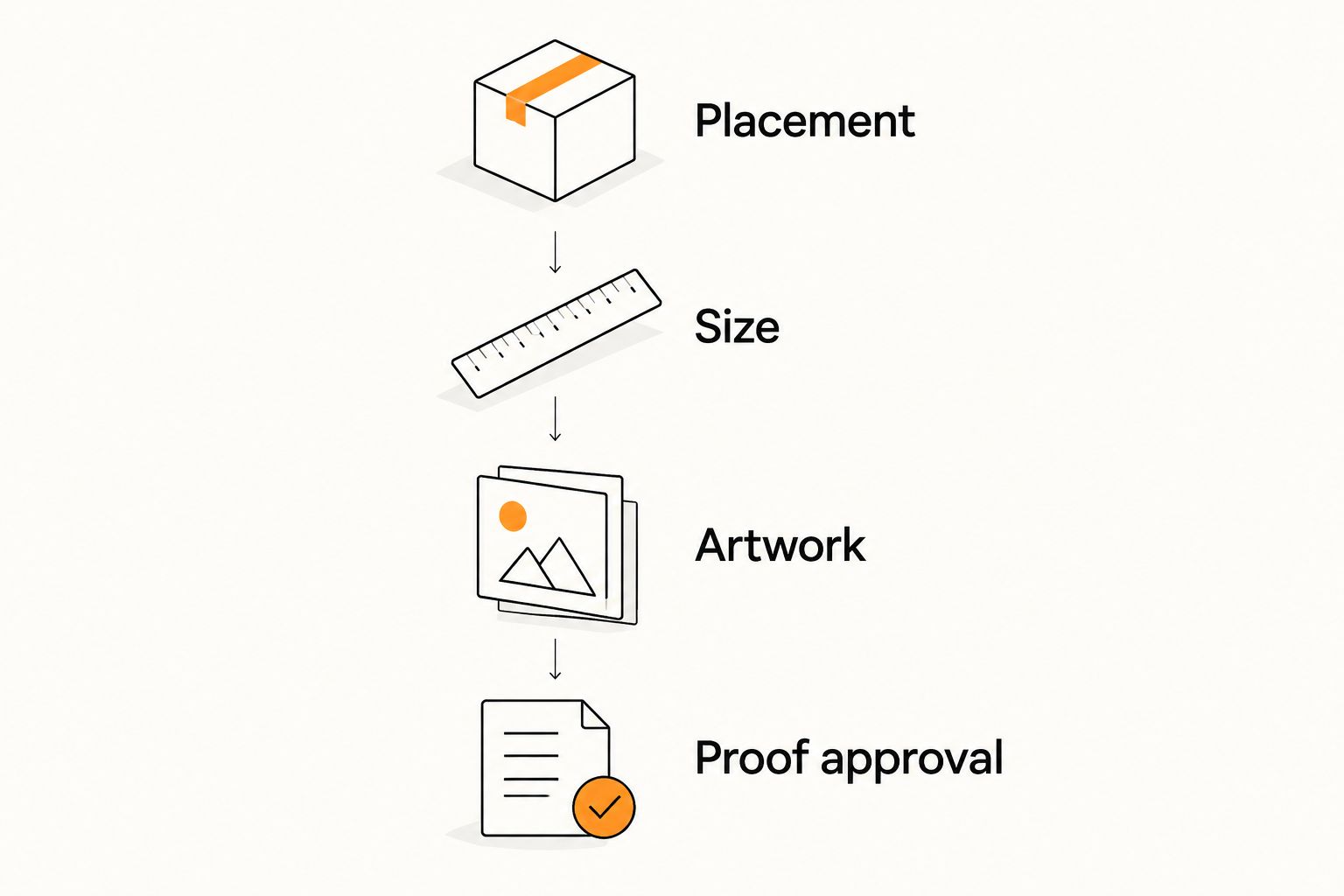
Supplier selection works best after you settle the physical job. Follow this sequence so that each decision narrows the next one.
Placement
Identify the usable surface. Keep the sticker away from folds, seams and areas where the package changes shape unless that placement is intentional and suitable for the product.
Size
Measure the space, then print an actual-size paper mock-up. Place it on the package and check whether the smallest lettering remains useful at the distance customers will read it.
Artwork
Check spelling, logo proportions, border consistency and the intended cut line. For QR codes, preserve the quiet zone: standard QR codes use a clear border four modules wide around the symbol. Scan-test the final-size design on the intended surface.
Proof approval
Treat approval as a production decision. Confirm the finished dimensions and artwork version, then record the approval date so the production schedule has a clear starting point.
Quantity comes after these checks. Base it on the packaging or event demand you can identify, and keep changeable information off a long-run sticker when that information belongs on an editable destination instead.
For QR-code stickers, check the destination as carefully as the printed symbol. A readable code still fails its business purpose if it opens the wrong menu, review page or reorder page.
When staying with Vinyl Disorder is the right call
Stay with Vinyl Disorder in 2026 when the current product meets your written specification and the ordering process meets your needs. A supplier change is not an improvement by itself.
For a repeat order, compare the approved artwork, dimensions, finish and intended application with what you need now. If those remain correct, familiarity is a practical reason to stay; if the package or use has changed, reassess the specification before simply reordering.
FAQ
What’s a practical Vinyl Disorder alternative for small-business stickers?
Vinyl Status is a practical alternative for small businesses ordering custom printed stickers from their own artwork. Compare the selected format, proof process, liner and production timing against the requirements of your packaging or giveaway order.
Is StickerApp better than Vinyl Disorder?
Neither supplier is automatically better for every sticker order. Consider StickerApp when material appearance drives the design, then compare the same dimensions, artwork and intended use with the corresponding Vinyl Disorder product.
Should I use a local print shop instead of ordering stickers online?
Use a local print shop when an in-person packaging discussion would resolve a fit or application question. Confirm the shop’s sticker capabilities and proof process before treating proximity as an advantage.
How should I compare sticker suppliers in 2026?
Compare suppliers using one written specification covering artwork, finished dimensions, shape, finish, quantity and application. Separate proof review, production and shipping so the schedules describe the same stages.
Does a digital sticker proof confirm adhesion?
A digital proof does not confirm adhesion to your package. Use it to check artwork and dimensions, and assess the physical surface separately before committing to the intended application.
When does sticker production time begin?
Use the selected supplier’s stated production trigger, not the upload date. When production begins after proof approval, artwork revisions happen before that window and shipping happens afterward.
What should I check before ordering QR-code stickers?
Check the destination, contrast, quiet zone, finished size and placement, then scan-test the design. Standard QR codes require a clear quiet zone four modules wide around the symbol.
One last thing
Before replacing a sticker supplier, make an actual-size paper version of the design and put it on the package. This simple check can reveal that the real problem is an oversized logo, unreadable text or awkward placement—not the printer.
Keep that mock-up with the approved specification. It gives your next order a physical reference instead of relying on a screenshot.
Related guides
- Bulk custom stickers for small businesses: an ordering guide
- How to size a custom logo sticker for your product
- Stickers vs. labels: which to order for your products